Large Book plays VERY SLOW in InteractPlayer

 Stop Draw Action needed
Not sure if this is a bug.. I want to create a coloring page. I used On Drag > Drawing > Draw and set the line width and color. This works ok. But I don't see a Stop Draw option available that I could assign to an On Drag End action. Please advise if there is a better way to do this so user can stop using the draw action and select another crayon color. Not sure what the difference is between draw and draw free... The Draw Free option doesn't seem to work either. Might be helpful to have a youtube tutorial on how to create a coloring book page with the Drawing tools. Thank you.

Based on Inna's response this seems not to be a bug.

Kindle Fire
"We wanted to try your app on the Kindle but these links don't go anywhere. It just opens a new tab that says "about:blank." I clicked the Windows link on my laptop and it was the same thing."
I told her to upload the interactplayer from the app store and she says it isn't available in the kindle app store. I don't know anything about kindles...can they access the itunes app store?
Any ideas?
Thanks


not holding elements

 Make highlighting text decoration overrule default

Animation properties doesn't match those in the action set manager
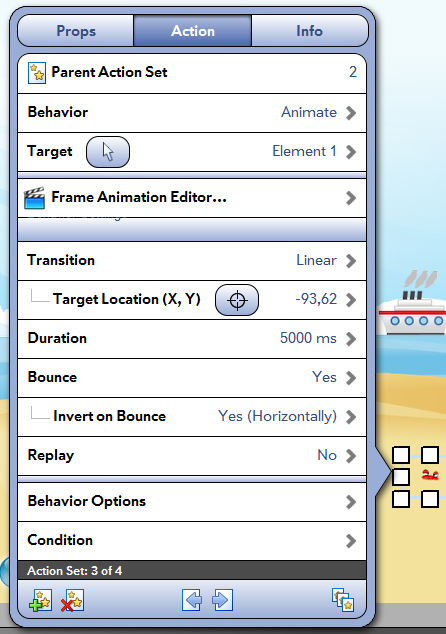
Same object, different values:
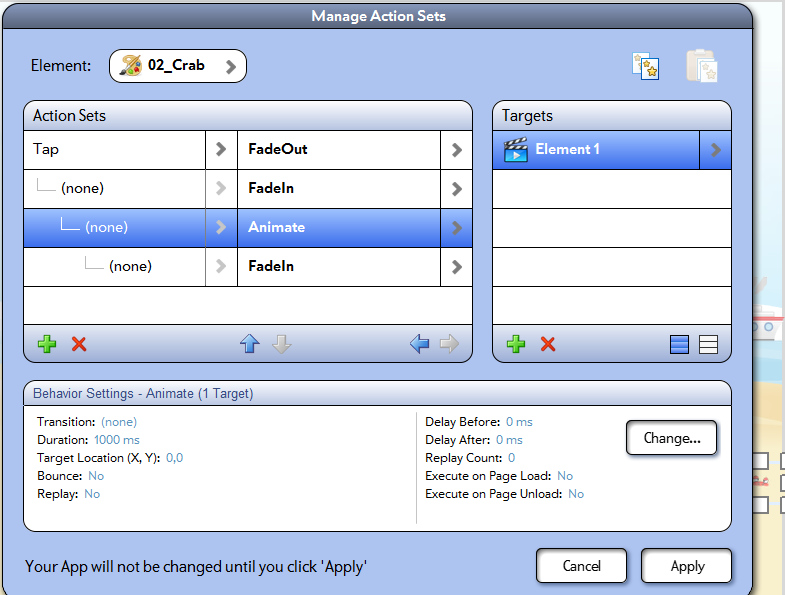


Empty Messages
IB is showing empty messages after latest install.
Scenario:
* I uninstalled the existing IB installation.
* Deleted all files from Program Files\InteractBuilder and My Documents\InteractBuilder.
* Downloaded a new copy from the website, latest version available was 3.2.5.
* After installation, it downloaded 3 updates.
* I restarted IB, and started seeing all menus and alerts without any text in them.
We have seen this happen in Windows when the font didn't install properly. Go ahead and reboot your machine entirely and then run the InteractBuilder again. This should fix the issue.
Changes not saving and text box sizes reset after installing latest version this morning.
Text box size is being reset to smaller width on all existing pages after installing latest IB3 update this morning (10/7). The result is the text within the existing text boxes is wrapping and being hidden from view.
When I try to readjust the width on the text boxes and preview in Interact mode, the change made is not being displayed and when I go back into design mode the change has not been saved. When I close and reopen the app and try to resize the text in design mode, the change does not save. Happens consistently. The odd thing is the info box indicates the width is wider than what is actually being displayed in design and interact mode. I CAN'T SAVE THE FIX TO THE PROBLEM, either using the text box handles or the info box to reset the width so the text isn't wrapping and hidden from view.
Please fix as soon as you can, thanks.
Actions not always saving again...
I'm having trouble getting my actions to save again. I have about six static elements on screen that on tap will show a hidden larger animated element that has a short transition. On tap I also make the static element hide any other animated elements so only the current animated element one will display. Problem is the actions are not sticking. Only the first two, On Tap Show Animated Element and On Tap Animate Animated Element stick. The other Tap actions to Hide all the other element elements is vanishes after previewing it in Interact mode. This was working ok for a day or so but not it isn't saving the actions again.. and I did install the latest update. Thanks for looking into this one.
Could you provide us with a sample app with one page showing this problem to alin@interactstudios.com?
selection tool suggestion
It would be great to have a selection tool like photoshop where you can drag a box around a group of elements to delete all at the same time. Selecting one at a time is kind of tedious when you've got pages with 50 or so elements.
Just a suggetion.
Kundesupport af UserEcho