Line shape default Anchor Points are bad
Horizontal line shapes are given default Anchor Point Middle-Center.
Vertical line shapes are given default Anchor Point Middle-Center.
This doesn't work for either of them.
They will not stay in their proper place. Even fixing the position by drag/dropping them does not work. They shift as soon as you navigate off the page and back.
Horizontal lines: TOP-center fixes the issue.
Vertical lines: Middle-LEFT fixes the issue.
This does not look like an easy fix. The anchor points really need to shift based on the axis the line is on
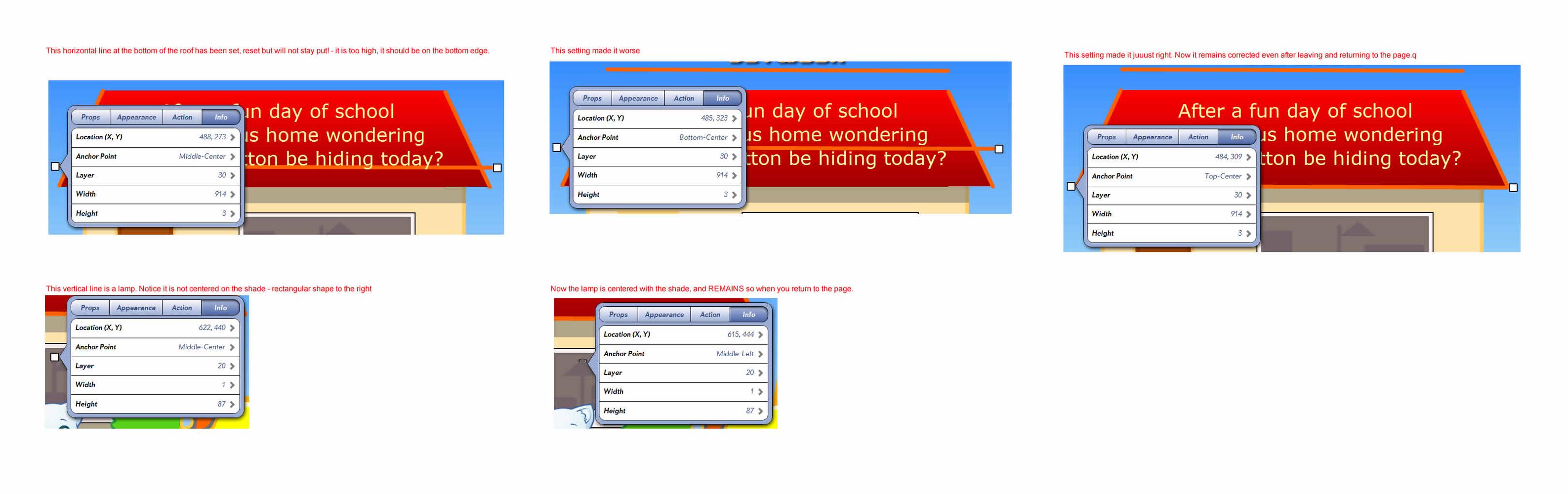
Ack! Also, you cannot directly create stable vertical lines! I created a new test line, clicked a node and dragged it to a vertical position. left/returned to page, it went back to its original 45 degrees downward! Twice, even with middle-left. Then I changed it to horizontal, left/returned. At least this time it stayed horizontal, but bumped up. Changed it to T-C, and it became stable. NOW I returned it to vertical, still T-C. left/returned, it shifted left like this bug. Change to M-L. Stayed stable. But this is a hell of a way to create a vertical line!

 Contest submission date
Just checking to see if the submission date is still January 5th considering the big update coming up.
Cheers!

http://eepurl.com/LtxAL

Sharing an App to ipod touch

When you share an app to the Ipod touch everything works except when an animation is activated the animation graphics are to large.
Thanks for reporting this, we will definitely address this issue. By the way, I love the lion :).

 Add Draw free dotted line option
It would be nice if you could enable the use of a dotted line when drawing. Thanks.
We added this to our plan for version 3.6 (no date yet).

Global Variables?
--
Adeel

On the page where the user chooses from the three options, add one invisible global counter, and set its value to a specific number depending on the choice. For example, if the user taps choice 1, set the counter to 1.
On the other pages, use conditions that depend on the global counter. For example, show image 1 on page load if the global counter's value is 1, show image 2 on page load if the global counter's value is 2, and so on.
It works similarly to letting the user select the language in which they want to view the app, as demonstrated here: Creating a Toggle for Narration, Language, etc.

Global element not showing on new Interactplayer 4

counter condition play audio and blink the visible counter
I applied a conditions that display the numbers up to 5.
When the condition is true, an audio plays and I would also like the final number 5, to blink. So far, only the blinking is working. The audio will not play when I have the blinking behavior added.
I tried this out, and it should work if you chain the two behaviors. First, the PlayAudio should happen when the condition is true, and the Blink behavior can be chained after it, without a condition. The two should happen at the same time, because when something is chained to happen after a PlayAudio behavior it does not wait for the audio to finish.

New COPPA policy parental gate?
Since Apple has introduced this new policy for apps with a link out of the app, I have seen some ideas for parental gates, like a math problem to solve and type in. I would like to add something like that to my app.
How can we implement that into a tapped link on our apps? Can someone give me an example for InteractBuilder?
Here's an article with some interesting examples of separating content that might involve linking outside of the app:
How Are Kids' App Developers Connumicating to Parents?
To use math equations, you could use the SetText behavior in combination with a condition that checks whether the answer is correct.
Some of the techniques involve multi-touch, or other interaction gestures that might be less familiar to young children.
Interact Player Error
Thanks a bunch, you guys are great!


Status of Word Highlighting in IB4
Служба підтримки клієнтів працює на UserEcho