Publish Window - Add Seller and Developer input field

 New ipad player sound not working anymore
Found my password!
The animations are working fine however the sound does not work anymore on my app. There are also 'slow down' issues with the new player on the ipad 2.
eg: The ipad 2 doesn't respond to taps immediately, as a result when I tap a few times it takes me past several pages at once.

Would be helpful if you can share a 1 page app that demonstrates the "tap" problem that you are having. You can share your app with ezra@interactbooks.com.
We cannot recreate the audio issue. Please make sure you are using MP3 files.

Drag<erase
Having trouble with Drag Erase with an element behind another element in Interact Player. When I try to erase, it pulls the element behind, in front and then it gives me an infinite thinking beach ball and I have to force quit to go further.
Thanks!

Error when jumping to another page
I keep getting an error below when jumping to other pages in Interact mode. Error occurs after clicking element and when the requested page starts to load. This happens randomly but frequently, like every other time I visit the same page in Interact mode. This happens in a number of places in my app. I checked the code on all the page elements and nothing is obviously causing the issue. Action on element is simple On Tap, animate, jump to page #. Even occurs on a static element with no animate action, just Tap > Jump Page #.
Please try to fix this as my app is getting close to being launch ready. Thanks!
InteractBuilder Version: 3.2 Build 308
Device: MacBook Pro
Processor: Intel Core i7
Memory: 4 GB
System: 10.7.5
--------------------
An application error occurred while attempting to perform the last action.
Restarting InteractBuilder is recommended.
An application error occurred while attempting to perform the last action.
Restarting InteractBuilder is recommended.
Error: Chunk: can't find background / Chunk: error in object expression / send: bad target expression
Handler: Behavior_Animate_PlayFrame
Hint:
Location: Line 0, char 1
Object: button id 1008 of group id 1010 of card id 1002 of stack "Behaviors" of stack "/Applications/InteractBuilder.app/Contents/MacOS/Local Components/Data/InteractBuilder.livecode"
87: Line 0 at char 1: Chunk: can't find background
69: Line 3951 at char 64: Chunk: error in object expression ----> button id 7620071 of group id 7620042 of card id 1140 of stack "/Applications/InteractBuilder.app/Contents/MacOS/Local Components/Data/InteractBuilder.livecode"
532: Line 3951 at char 1: send: bad target expression
253: Line 3943 at char 1: if-then: error in statement
241: Line 3943 at char 1: Handler: error in statement ----> Behavior_Animate_PlayFrame
353: Line 0 at char 0: Object Name: ----> button id 1008 of group id 1010 of card id 1002 of stack "Behaviors" of stack "/Applications/InteractBuilder.app/Contents/MacOS/Local Components/Data/InteractBuilder.livecode"
line 150 of handler "errorDialog" of button "stsErrors_FS" of card id 1002 of stack "libSTSErrors"
line 10946 of handler "DoError" of stack "InteractBuilder" of behavior button "Stack B" of card id 1002 of stack "Behaviors"
It is best that you set all your "Jump" action sets to run AFTER any animations. Right now our guess is that you have Jump behaviors occurring while there is animation going on. Make sure also that if you have animations that are in a loop you put a "STOP ANIMATION" action set for each animation prior to running the Jump action set. You should setup the Jump action set to run after the animation stops.
We will put some code in the next version that will prevent this from happening, but for now you can follow the directions above to avoid those errors.

global counters and page 1


How to know the version number
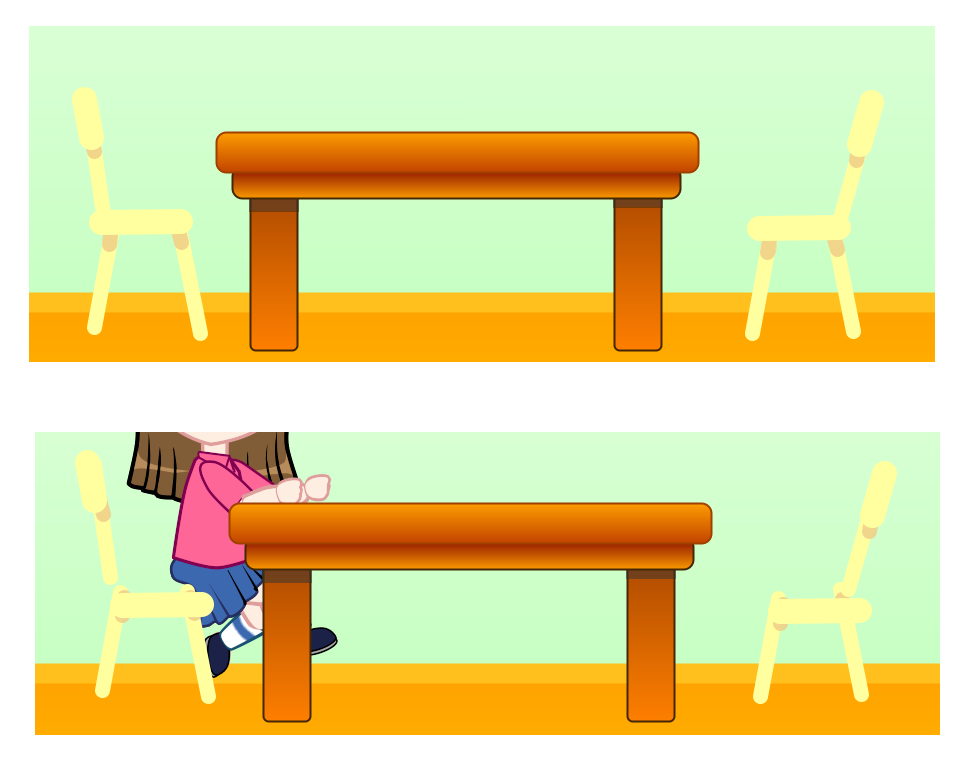
shape position corruption
In this case it's the 2 chairs, they're both all lines. Notice the table has no problems. It's made of just rounded rectangles. I have lines mixed with rectangles on other pages and they behave.
global element sound error
Thanks!

 Unable to realign page order
The question about adding a page before or after the current page only happens on the first page of the app and should still be working. Maybe you had the app open to a page other than the first page when you tried it?
When you describe realigning page order, are you changing the order of the pages using the page manager? Do you follow the same steps as described in the guide (Page Management - Reordering Pages)?
manage action set tool
Customer support service by UserEcho