We want to hear your feedback! Submit your Questions, Ideas, Suggestions, and Problems.
Keine ähnlichen Beiträge gefunden.

0
Wird überprüft
 IB 4.0 | Match Behavior Stopped Working
I converted my existing app into IB 4.0, and the Match behavior is no longer working.

Antwort
Ezra Weinstein (Administrator)
vor 12 Jahren
We are working on a small document/tutorial that will describe how to setup a Match activity using the new engine. We mentioned on our last webinar that this activity will have to be rebuilt because we change the Match/Unmatch from being interactions to being conditions. So you will have to rework the page a little bit, but it actually should make the activity simpler.

0
Beantwortet
 can't find my app in Google play
I can't seem to find my app in google play when I type it's name on my phone or tablet, however it is already available for download. What should I do to find it?

Antwort
Alin Alexandru Matei
vor 13 Jahren
Google takes time to index their search engine, we have no control over that process and we don't know how long it takes. Here is a direct link to your app:
https://play.google.com/store/apps/details?id=com.interactstudios.msacademic
https://play.google.com/store/apps/details?id=com.interactstudios.msacademic

0
Not a bug
New App not showing any elements except the background in interact mode
Just created a new App and in interact mode it is not showing any elements except the background. Not sure if anything is working because I can't see anything. I double checked and the elements have visible at runtime is active.

Antwort
Inna Komarovsky
vor 12 Jahren
How did you add the elements? Through PSD import, drag and drop or by adding new element option?
Also it will be great if you could send a sample app at alin@interactstudios.com so we can take a look it.
Also it will be great if you could send a sample app at alin@interactstudios.com so we can take a look it.

0
Wird überprüft
How do I determine appropriate screen size?
Hi, I built a book for Microsoft Surface Pro 2, which has a screen resolution of 1920x1080. I used this resolution as the size when building the book. However, the Player app does not size the pages correctly in Windows 8.1 on the tablet, nor in the Bluestacks emulator running Android on the tablet. In both cases, what I see is a very zoomed in view of perhaps only 1/3 of the page. I would like to avoid resizing everything to another size that does not work. How do I determine the correct size to use?
0
Danke
reducing app size
Ezra, Thanks for the tip to use www.tinypng.org . It took a bit of time but it turned my 121MB app files to 71.6MB app.
Ann
0
Fixed
GUI issue when modifying "disable page flip" option
When I try to change disable page flip forward or backward from Yes to No, it shifts the arrows near the pages so I can't go on and do the same for the next page. Quite annoying:
Before:
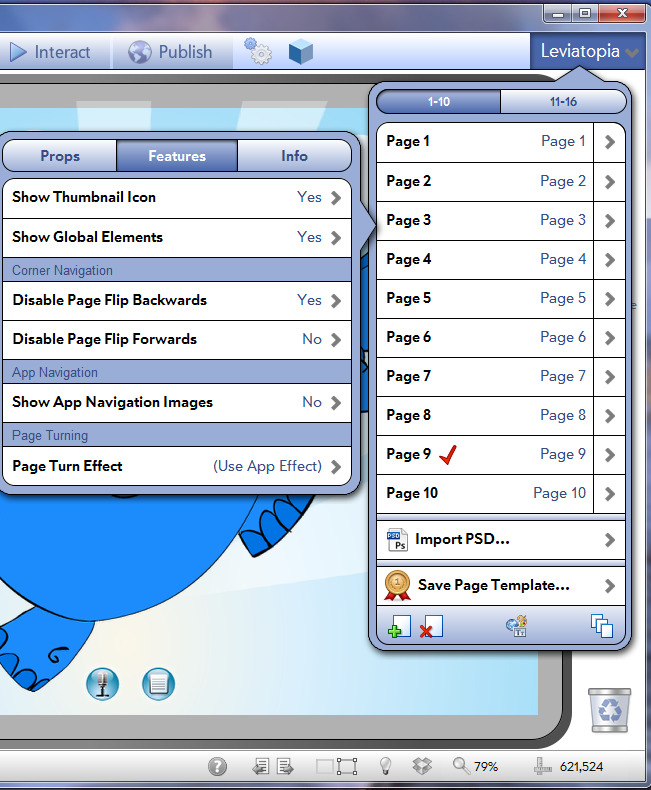
After:
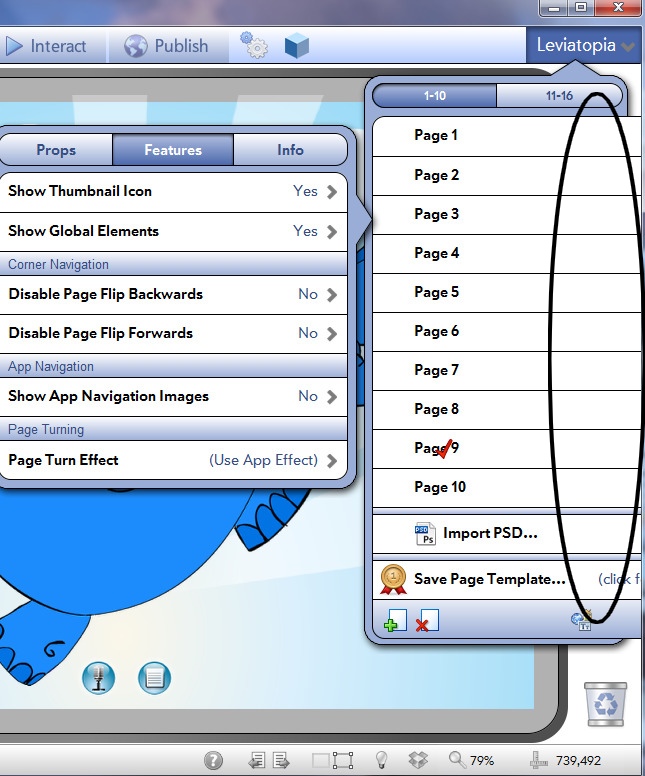
Before:
After:
Antwort
Ezra Weinstein (Administrator)
vor 12 Jahren
Is this visual bug remains after you restart IB3 to?

0
Fixed
Text does not scale properly when sharing.
Also when I updated to the last version all my apps got deleted.
Antwort
Inna Komarovsky
vor 12 Jahren
We are fixing the font size issue. As far as your apps being deleted, our update process does not touch your documents folder so it is unlikely that our update process deleted your apps. Can you let us know where your apps were stored? Did you keep them in the default folder? What update did you run? How did you run the installation?

0
Wird überprüft
Long time Syncing
i have tested a 3 page book and its is working
but im having problems with my other book -- it always stuck at syncing to server -- my book is only 20MB only 22pages --
but im having problems with my other book -- it always stuck at syncing to server -- my book is only 20MB only 22pages --
Antwort
Inna Komarovsky
vor 11 Jahren
Hi there,
This could be an issue with one specific element or action set. In the book that is not working, do some of the pages work if you try to preview one page by itself instead of uploading the whole app?
This could be an issue with one specific element or action set. In the book that is not working, do some of the pages work if you try to preview one page by itself instead of uploading the whole app?
0
Geplant
Constraints not working
In v3, I never seemed to need constraints, as it was not easy to drag an object completely off screen. Now, however, dragging using the "follow me" behavior seems very uneven, sometimes following nicely and sometimes letting you fling the object completely off-screen. Sometimes it even seems to send the object in the wrong direction (opposite the way you are trying to drag it). I was hoping to fix this somewhat by constraining the area to the dimensions of the screen, but this does not seem to work--I can still fling the object completely off screen.

0
Wird überprüft
Does the the 'snapshot' function work on all devices?
Is the the 'snapshot' function supposed to work on all devices (PC, ipad, android tablet & smartphone)? I have tried it and nothing seems to happen. I want to tap on an element have have the snapshot recorded for the user (of course, they can take their own screen capture at any time but an in-app button is more conducive). BTW, does a snapshot capture the same exact area as a screen capture?
Thanks!
Thanks!
Antwort
Inna Komarovsky
vor 12 Jahren
The SnapShot behavior seems to currently be not working, and we have reported this to our lead developer. Thank you for bringing our attention to this!
Customer support service by UserEcho