color differences between the imported PSD and the animation elements
Another question for you: I imported a RGB PSD file into my page. And then, when I add an animation element onto page (I dragged the png files of an arm waving onto the "Design" screen), the colors are not the same. Screen shot attached.
Actually the animation element (the arm) is more accurate color. Those are the colors I see when I work inside Photoshop. When I import the PSD the colors come in lighter.
I did use "TinyPNG" program to reduce file size.
The artwork for the animation elements was created from the same PSD artwork.
Any hints on getting the colors to match between my PSD imported elements and the PNGs (animation element)?? It looks odd to have a boy with two different skin tones! The darker skin tone is what I want.
Thanks!
Brook
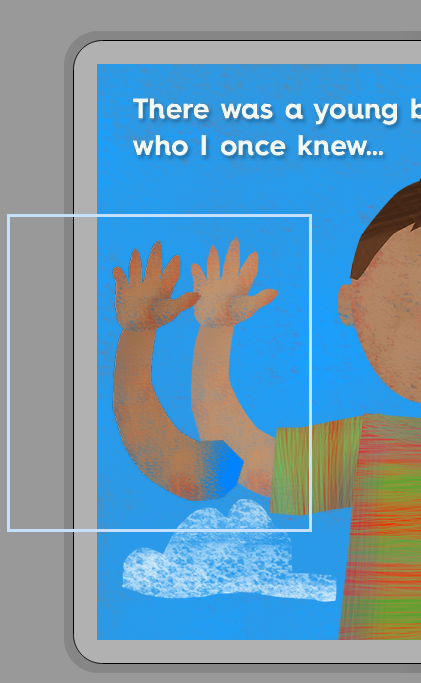

Regarding your first question, this is a problem we've noticed as well, and although I'm not sure myself how it works since I'm not on the programming team, I could give you a couple of workarounds to make sure the colors are consistent in your app.
Since you mentioned that you prefer the darker colors, which show up when files are imported as separate PNGs or animations but not as Photoshop documents, the workarounds for this would mean replacing the images assigned to the elements with PNG files.
1. First, there's a script in Photoshop for exporting the layers to PNGs. Open your Photoshop document, and go to File > Scripts > Export Layers to Files. In the window that comes up, you can select a destination and a file prefix (so that all of the exported files are together if they start with the same letters) and then run the script.
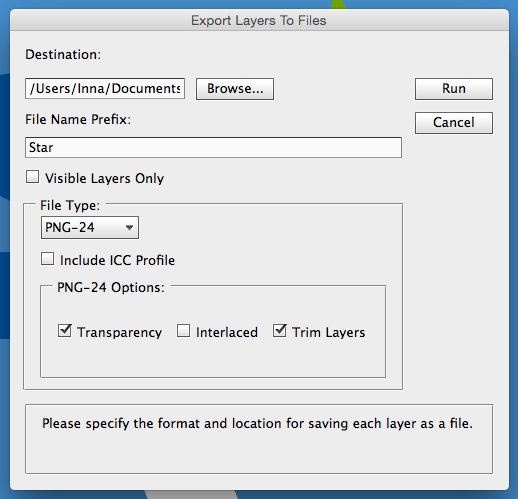
2. You'll get a separate file for each layer of the Photoshop image. If you'd like, you can run these through TinyPNG at this point. If you want to place the images yourself, you can just drag this group of files into InteractBuilder and go from there, but if you have a page where you want to keep the locations and action sets you've assigned, then you can use the ideas in step 3.
3. You have two options for replacing the files in your app folder with these new exported PNGs:
- One option is to replace them by re-assigning the image file for each element. (Click on an element to see its properties, select the Image field, and then choose Select Image File.)
- The other option is to give each file the same name as the matching file in your app folder. Once you rename the group of files, you can move them to your app folder. Since the files have the same names, you'll get a dialog box asking if you want to replace the files with the new ones, and you can select "Replace."
Alternatively, if you do decide that the lighter colors are ok and you would rather have the animation colors match the rest of the image, you can follow the steps under the "Corner Dots" heading of this user guide article: Setting Up Your Photoshop File.
(I'll address your other questions in a separate comment)

Accessing my apps from another computer! I commented updated on the error!!
I am wondering if it is possible to access my apps that I have created on both computers. I can easily install InteractBuilder on both computers but will I be able to access my ebooks using some sort of cloud sharing or database backup so I will be able to access and edit the apps from both computers while having them both consistently being updated?
Please ANYONE!? It would be very helpful and would allow me to create multiple apps over the years since I am a graphic designer, I like to do a lot of work OUT of my house. Please help me become mobile and able to work anywhere but these four boring walls!!!

 Error when clicking on an element
InteractBuilder Version: 3.3 Build 325
Device: System Product Name
Processor: 1 Processor(s) Installed.
[01]: x64 Family 6 Model 23 Stepping 10 GenuineIntel ~1999 Mhz
Memory: 3,327 MB
System: NT 6.1
--------------------
An application error occurred while attempting to perform the last action.
Restarting InteractBuilder is recommended.
An application error occurred while attempting to perform the last action.
Restarting InteractBuilder is recommended.
Error: Chunk: can't find background / Chunk: error in object expression / Chunk: can't find object / Object: does not have this property / put: error in expression
Handler: Element_SetBehaviorTarget
Hint:
Location: Line 0, char 1
Object: button id 1004 of card id 1002 of stack "Behaviors" of stack "C:/Program Files/InteractBuilder/Local Components/Data/InteractBuilder.livecode"
87: Line 0 at char 1: Chunk: can't find background
69: Line 6959 at char 58: Chunk: error in object expression ----> group id 8616567 of card id 1139 of stack "C:/Program Files/InteractBuilder/Local Components/Data/InteractBuilder.livecode"
77: Line 6959 at char 58: Chunk: can't find object
456: Line 6959 at char 8: Object: does not have this property
465: Line 6959 at char 1: put: error in expression
241: Line 6959 at char 1: Handler: error in statement ----> Element_SetBehaviorTarget
353: Line 0 at char 0: Object Name: ----> button id 1004 of card id 1002 of stack "Behaviors" of stack "C:/Program Files/InteractBuilder/Local Components/Data/InteractBuilder.livecode"
573: Line 7626 at char 1: Handler: can't find handler ----> Element_SetBehaviorTarget
253: Line 7612 at char 1: if-then: error in statement
587: Line 7609 at char 1: switch: error in statement
253: Line 7608 at char 1: if-then: error in statement
241: Line 7608 at char 1: Handler: error in statement ----> Element_TouchPointSelected
353: Line 0 at char 0: Object Name: ----> button id 1004 of card id 1002 of stack "Behaviors" of stack "C:/Program Files/InteractBuilder/Local Components/Data/InteractBuilder.livecode"
573: Line 7229 at char 1: Handler: can't find handler ----> Element_TouchPointSelected
253: Line 7166 at char 1: if-then: error in statement
253: Line 7152 at char 1: if-then: error in statement
241: Line 7152 at char 1: Handler: error in statement ----> Element_MouseDown
353: Line 0 at char 0: Object Name: ----> button id 1004 of card id 1002 of stack "Behaviors" of stack "C:/Program Files/InteractBuilder/Local Components/Data/InteractBuilder.livecode"
573: Line 44 at char 1: Handler: can't find handler ----> Element_MouseDown
253: Line 43 at char 1: if-then: error in statement
241: Line 43 at char 1: Handler: error in statement ----> mouseDown
353: Line 0 at char 0: Object Name: ----> button id 1020 of card id 1002 of stack "IBElements" of stack "C:/Program Files/InteractBuilder/Local Components/Data/InteractBuilder.livecode"
line 150 of handler "errorDialog" of button "stsErrors_FS" of card id 1002 of stack "libSTSErrors"
line 14245 of handler "DoError" of stack "InteractBuilder" of behavior button "Stack B" of card id 1002 of stack "Behaviors"

free draw on element?
Is it possible to free draw (or something with that effect) on the background?

Just import the background as a normal element and then add a Drag-DrawFree behavior with Target (self).

Using counter to affect message displayed on subsequent screen
I am trying to follow this procedure (http://interactbuilder.screenstepslive.com/s/5404/m/16264/l/193580-creating-a-toggle-for-narration-language-etc). I have one object that can be drug to either the right or left side of the screen. I've created a counter so that the value is 1 if it is on the left side and 2 if it is on the right side. (The counter works, I have it set to display).
Now, on the next page, I would like to display text based on the counter value. I have set the text to invisible at runtime, then set an action to show if the appcounter is set to value 1 (or 2, for the other text). However, when I go to the page, neither text displays. I have set the "Refresh on Load" to "No."
What am I missing? Are there any settings that are not shown in the graphics in the guide?

manage action sets moving up and down by layer
When I use the arrow to move the highlighted layer up in the pic below it moves the layer to the top and when the down arrow appears it only moves the layer to the bottom. i can't get it to move up or down by one. i need to move this layer to the middle of these action sets. Is there a max of action set layers on one action?
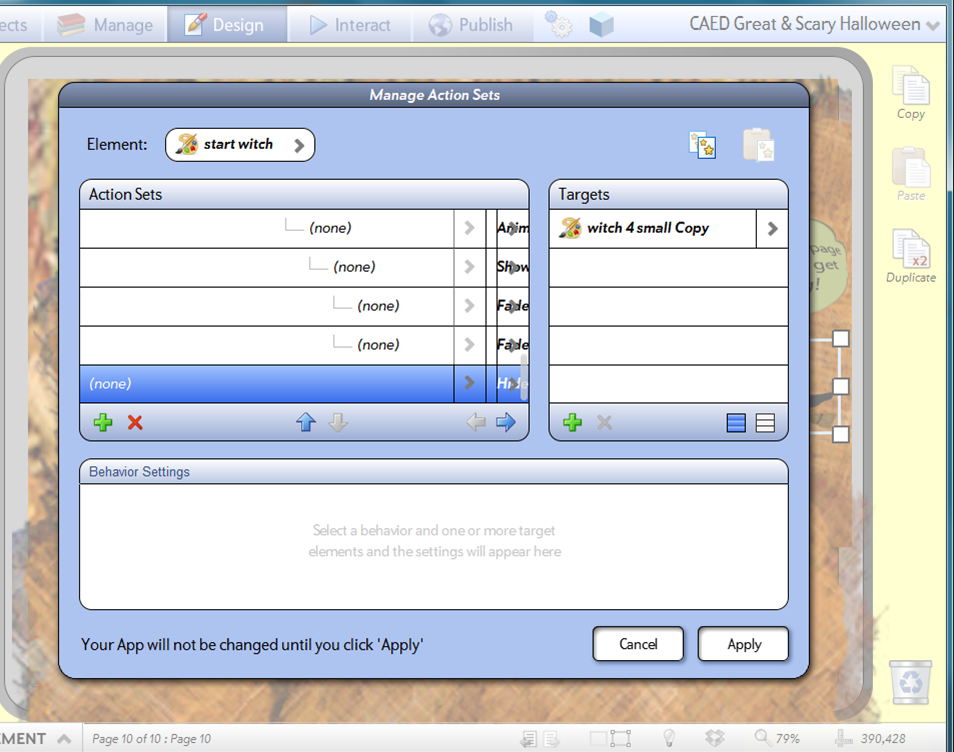
Try to Tap the right arrow as many times as you need to chain that behavior to the one you want, it will move up automatically.

 Load element from the library
It would be nice if one could load an element from the library on command rather than having to put everything on stage and hide it until used. I think this could be a good work around to performance issues in interact mode if one wants to use a lot of different animations that play for a few seconds on tap and then unload when another object is clicked. (You can do this with Flash). Thanks for considering.

We already achieve this by using the hide/show and move. Loading elements from disk would not be efficient and for now we do not see this as a valid solution for improving performance. When an element is not visible it is not taking up any resources from a memory standpoint.

Having trouble uploading my app to IPAD
and gives me an error message: a problem occurred with this webpage so it reloaded. Any suggestions for me? Thanks

Line shape default Anchor Points are bad
Horizontal line shapes are given default Anchor Point Middle-Center.
Vertical line shapes are given default Anchor Point Middle-Center.
This doesn't work for either of them.
They will not stay in their proper place. Even fixing the position by drag/dropping them does not work. They shift as soon as you navigate off the page and back.
Horizontal lines: TOP-center fixes the issue.
Vertical lines: Middle-LEFT fixes the issue.
This does not look like an easy fix. The anchor points really need to shift based on the axis the line is on
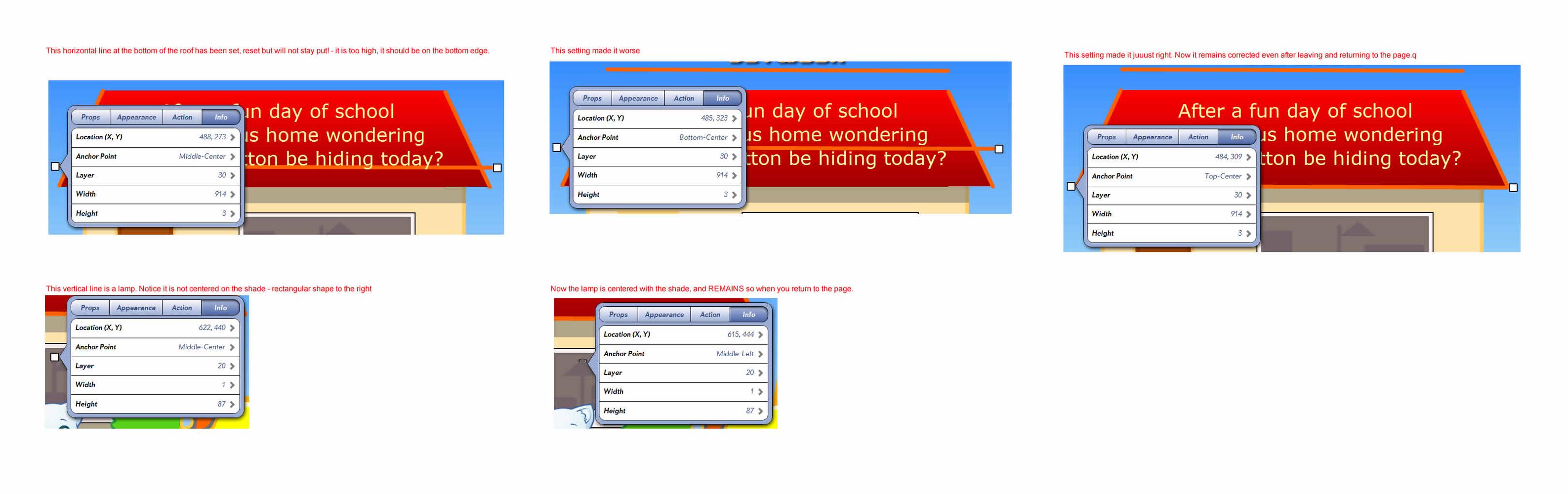
Ack! Also, you cannot directly create stable vertical lines! I created a new test line, clicked a node and dragged it to a vertical position. left/returned to page, it went back to its original 45 degrees downward! Twice, even with middle-left. Then I changed it to horizontal, left/returned. At least this time it stayed horizontal, but bumped up. Changed it to T-C, and it became stable. NOW I returned it to vertical, still T-C. left/returned, it shifted left like this bug. Change to M-L. Stayed stable. But this is a hell of a way to create a vertical line!
Contest submission date
Just checking to see if the submission date is still January 5th considering the big update coming up.
Cheers!
http://eepurl.com/LtxAL
Customer support service by UserEcho