Not able to open app in interact mode.

 Duplicate Element
I'm unable to get the duplicate element feature to work in interact mode with a double tap.

 rotate 90 degrees



Are you referring to InteractBuilder or to an app that you have built using InteractBuilder? Is it too large or too small for the display screen?

conditions
I want an element to SHOW after several other elements are turned into the same particular color, they all must be the color before the main element may show. I am able to create the interactions that recolors the elements. I then have the element I want to SHOW set up as "not visible at run-time + "execute on pg load" and I was trying to set the condition so that the element would show when all of the color changed items are the same color. I can only add one element as the conditional item instead of all the items. i do not want the main element to show until all elements have changed color.
The best way of handling this would be to create a counter, each time an element was changed to the correct color you would increment the counter. Once all the elements change color the counter would reach a certain value. You would then add an action set to each element which would be a "Show-Main Element" action set with a condition set to a specific counter value. This way no matter what order the elements were displayed in, it would show the main element as long as the counter reached the correct value.
Suggestion: Drawing behavior
Thanks!!!
When you put together the Drag-DrawFree action set, the builder shows a "Line Color" field and a "Line Width" field in the behavior settings below the name of the behavior, so you can select any color and line width that will appear when the user drags a finger on that element.

Can I drag and drop a .jpg of a texture or design and have it fill an outline or template. that can then be printed? This could be used as a coloring book that has textures and designs dragged into it.
Barbara
page turn effect curl
I'm trying to duplicate a page curl effect that I used to be able to do in interact and can't seem to figure it out anymore.
I'd like the page to curl from the top right to the left. I used to be able to curl it with a finger drag and control the speed of the page turn and it had a cool effect where you could see a transparency on the back of the page. Can we still do this?
For some reason my page turn images are not showing up either. I've selected "show app navigation images" and still nothing.
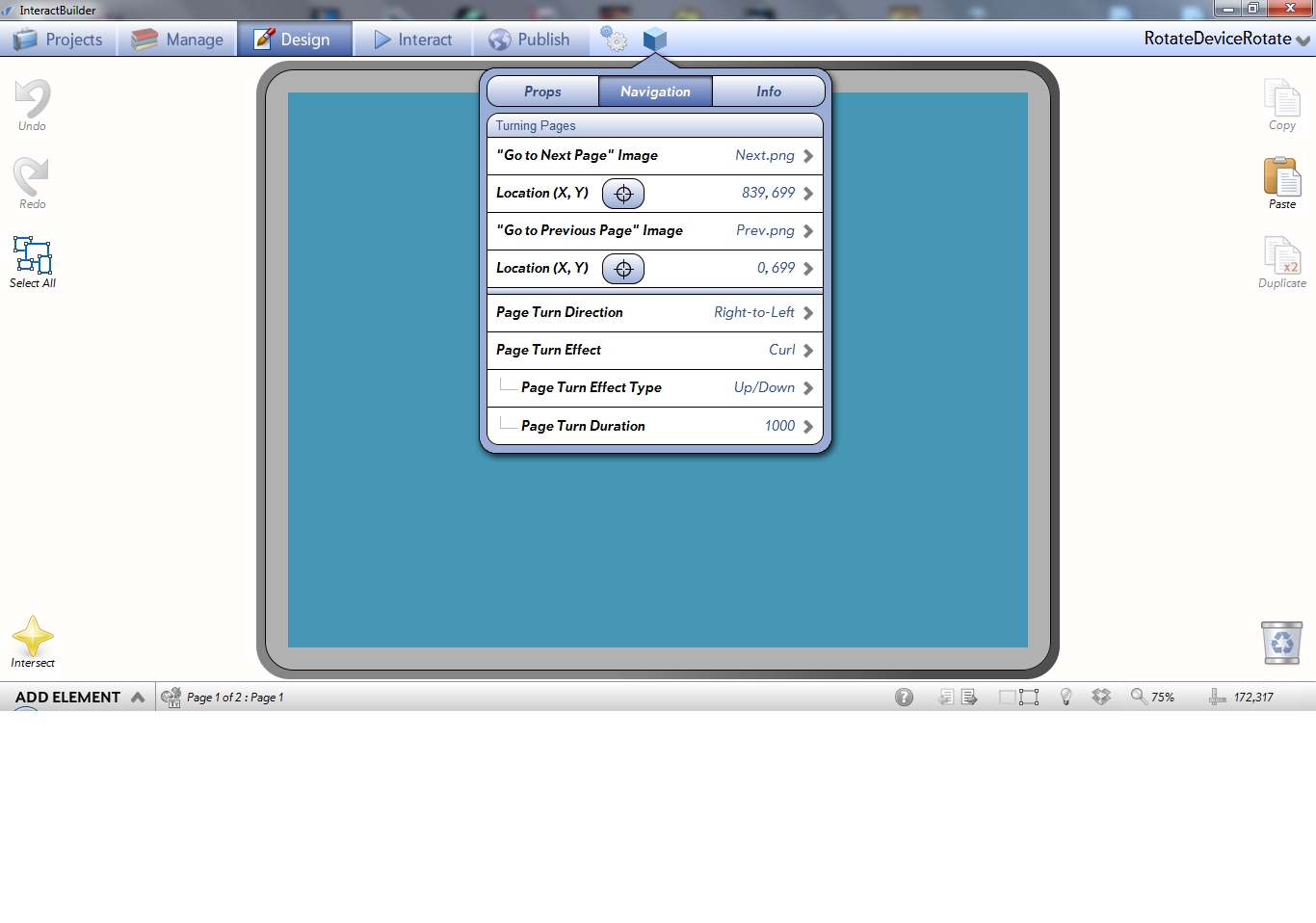
Hi Melissa, the navigation images are showing for me as they should. As for page effect you can select it as in the example bellow:

delete a device?

New Player problems: Error: 404 downloading app
Hi, I get am Error:404 message "An Error occurred when trying to download the selected app (Error: 404 Not found)" when trying to download certain shared apps on the player... they weight around 62 and 103 MB, so are quite heavy... the builder did processed them to share, though.. this happens both on iPad & nexus tablet (on Nexus I get the message; on the iPad, the player just closes down).
Now, the problem is that on Monday I should show the app to a client.. so I am a bit on trouble : /
Based on our emails back and forth it seems that your app never successfully uploaded so the 404 means that it cannot find the app. My suggestion is to try this from a faster internet connection. 177MB is not too heavy for an app, but it is heavy if you don't have a reliable and fast internet connection.
Service d'assistance aux clients par UserEcho