triggering two animations with one tap
this occurs while in INTERACT mode tapping on an element that should trigger two animations simultaneously. One animation begins with no problem but then this message is thrown. i tried it again after clearing cache and rebooting and the same thing occurred.
An application error occurred while attempting to perform the last action.
Restarting InteractBuilder is recommended.
Error: Chunk: no such object / Chunk: can't find object / Object: does not have this property / if-then: error in condition expression
Handler: Behavior_Animate_PlayFrame
Hint: _AnimationElement
Location: Line 3024, char 15
Object: button id 1008 of group id 1010 of card id 1002 of stack "Behaviors" of stack "C:/Program Files (x86)/InteractBuilder/Local Components/Data/InteractBuilder.livecode"
89: Line 3024 at char 15: Chunk: no such object ----> _AnimationElement
77: Line 3024 at char 15: Chunk: can't find object
456: Line 3024 at char 7: Object: does not have this property
252: Line 3024 at char 1: if-then: error in condition expression
241: Line 3024 at char 1: Handler: error in statement ----> Behavior_Animate_PlayFrame
353: Line 0 at char 0: Object Name: ----> button id 1008 of group id 1010 of card id 1002 of stack "Behaviors" of stack "C:/Program Files (x86)/InteractBuilder/Local Components/Data/InteractBuilder.livecode"
button id 1299 of card id 1002 of stack "libSTSErrors" of stack "C:/Program Files (x86)/InteractBuilder/Local Components/Data/InteractBuilder.livecode",errorDialog,150
stack "C:/Program Files (x86)/InteractBuilder/Local Components/Data/InteractBuilder.livecode",DoError,9972,button id 1004 of card id 1002 of stack "Behaviors" of stack "C:/Program Files (x86)/InteractBuilder/Local Components/Data/InteractBuilder.livecode"

copy paste actions
I'm unable to copy and paste an action set back into the same element. It asks me if I want to replace or add and then does nothing.

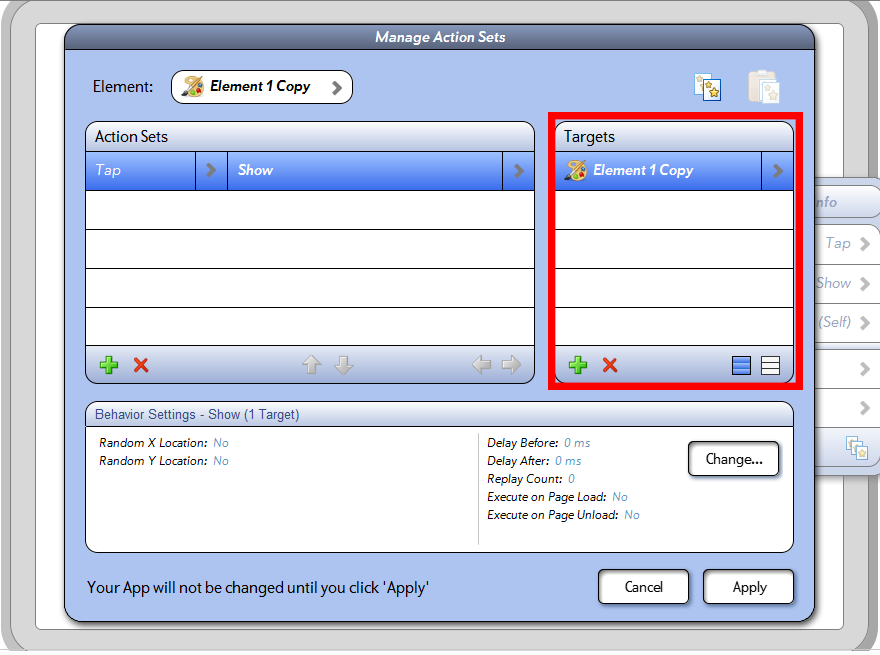
You don't have to copy paste the action sets everytime, if you want to add more targets.You can do that simply by using the green plus sign to the right as shown in the image bellow:

 Does updating an app and re-sharing to the same person use one of my allotted "shares"?
Thanks.
Here's an outline of this information, which we recently added to the user guide:
http://help.interactbuilder.com/s/5404/m/16264/l/196583-how-many-people-can-i-share-my-app-with
video not playing at same time and in front of frame
ALSO, when the video plays it jumps to the top layer on top of a graphic which is a frame. The intent is to have a frame with the video playing within it not on top of it.
This seems to be a bug, but here's a workaround that can help you achieve the effect you're describing. The three videos are able to play at the same time if they are all chained after another action set. For example, you can start by hiding the button that makes the videos play.
Tap-Hide (Self)
behaviors chained after (all chained under one parent action set):
-PlayVideo (video 1)
-PlayVideo (video 2)
-PlayVideo (video 3)
I couldn't recreate the problem of having a video appear in front of a graphic element. Are you sure the border is layered to be in front of the video?

 global elements
We're working on fixing the global elements problem as soon as possible. Thank you for the feedback!
Contest Entry troubles
1. The TIPS page, I wanted Molly to tap>spin, swipe>throw, drag>move, doubletap>stop spin. But it was interfering with the animation of the box. I changed it to only swipe>throw, drag>move. But the last upload, the swipe throw was not working very well.
2. I was having trouble with any drag>move interactions, but the last one seemed good, I hope yours is too.
3. Menu. It was working a week ago, but now when you click on the thumbnail, it will plays the audio and turns gray, and mostly won't jump to a page. Sometimes it does. Is there any way to chain these behaviors so that they all work together? It works great in the builderplayer, but not on the ipad.



InteractBuilder 4.0.2 Build 381conversion
However, the Page Load action does not work, wherever I click with the mouse, a little white circle shows up, and I cannot type into a text box. Actually, looks as though no actions work.
Are there any touchups we need to do after the conversion?
Incidentally, I just re-created the first few pages from scratch. Same thing happens. Plus when I clickInteract, it just goes to a particular page which is not the first page.
The white circle is just part of the way the app displays in browsers to signal that you have clicked an area, but the other two problems that you reported shouldn't need touch-ups. Did you have Explorer as your default browser when you tested the app in previous versions of InteractBuilder? We do suggest testing the apps with Google Chrome since InteractBuilder is optimized for this browser. Here are instructions on setting Google Chrome to be your default browser in case you're interested: How to Preview an App.

IB 4.0 | Draw Behavior Not Constrained By Layer

error during synchronization


Memory/match game?
I have checked the forum, user guide and YouTube channel, and though all 3 has some info on the subject, none of it is complete.
The forum has a link to an app that can be downloaded, and I tried that, and got an error while trying to open it in IB.
The user guide has a partially written instruction on how to do it.
The YouTube channel has a video about masking, but it's not really helpful in understanding the basics of how to do it, other than how to use a mask.
So, is there a guide or testapp somewhere, that will work with IB3, or can someone explain how to do it?
Any help will be most welcome :)
104 - Match Game.zip
Сервис поддержки клиентов работает на платформе UserEcho