
 Text field prompt not working

You download this file and then copy the folder (unzip it if you are on Windows, Mac should automatically do it) to the Documents/InteractBuilder folder.
Text Prompt.zip

 Problems uploading app to IPAD from Internet Interactive Player

4.0 IB How do we preview the apps on the device itself?

If you select the option "Make Public," this makes the app available to anyone who has the link. There will then be the option, "Copy Public Link." You can email this link to yourself and open it in your mail app on the device.

 Creating animation element from PSD
When loading a PSD onto a page, it would be great if the builder would suggest for all layers with same name + incremental numbers to load them as animation element. Otherwise, the raw material for a page has to split to different PSDs and folders of PNG files. This way - an N pages book will be stored in N x PSD files
Ranco
If the files are named in the PSD file like this :
NameFrame001
NameFrame002
and so on, the files will be implemented like a frame element.
Navigating between actions - please keep arrow buttons in place
When rapidly browsing through actions of an item, the entire actions dialog changes it's size and vertical position. It would be better if the bottom part of the dialog stays in place, otherwise there's always a "missed click" that goes outside of the dialog. This is annoying. You can scale the dialog, just please do it upwards.
Ranco
We can't always scale upwards, because it depends on the location of the element. I agree that this can be annoying, we will look at other options like Clint's suggestion to support the arrow keys or PgUp and PgDown.

Graphics below 50px are being enlarged!
Hi,
Ok, now I am having another problem. When I add a small graphic element to the page, the builder makes the image bigger, and it always plays it back in the "interact" and the "player" too big. It does not do it to images over 50 x 50 pixels!? Clint
We are unable to recreate this issue. We have tested with a graphic element that is 25x25 and it does not resize. Can you please send us a sample app showing the issue you are having? You can attach it to this site or share your app with ezra@interactbooks.com.

Spin Rate - Add # of rotations desired.
Thanks!


Page turning issues
After you clicked "Interact," did you specify that you want to preview all of the app's pages, not just the current page?
Are you using the Tap-Jump behavior on an element, or is this happening with the default page corners?
Windows player 3.2.5 still giving problems.
Hi Ezra, I have just downloaded the new versions 3.2.5. The builder seems to be working fine. But the player is still not working correctly. I am not getting any background images on my pages, and no animations are visible.
This is for the Windows player, have not tried the iPad version yet.
The new iPad player has not been released yet, we are waiting for Apple to approve it. I assume their announcements today helped delay things. Can you share an app with us that demonstrates some of the problems you are having. We tested in Windows extensively and have not run into the same issues.
Preview on InteractPlayer doent match the shared app preview on specific device.
Here is a snapshot of how it is built in interact BUILDER when I am in INTERACT mode.
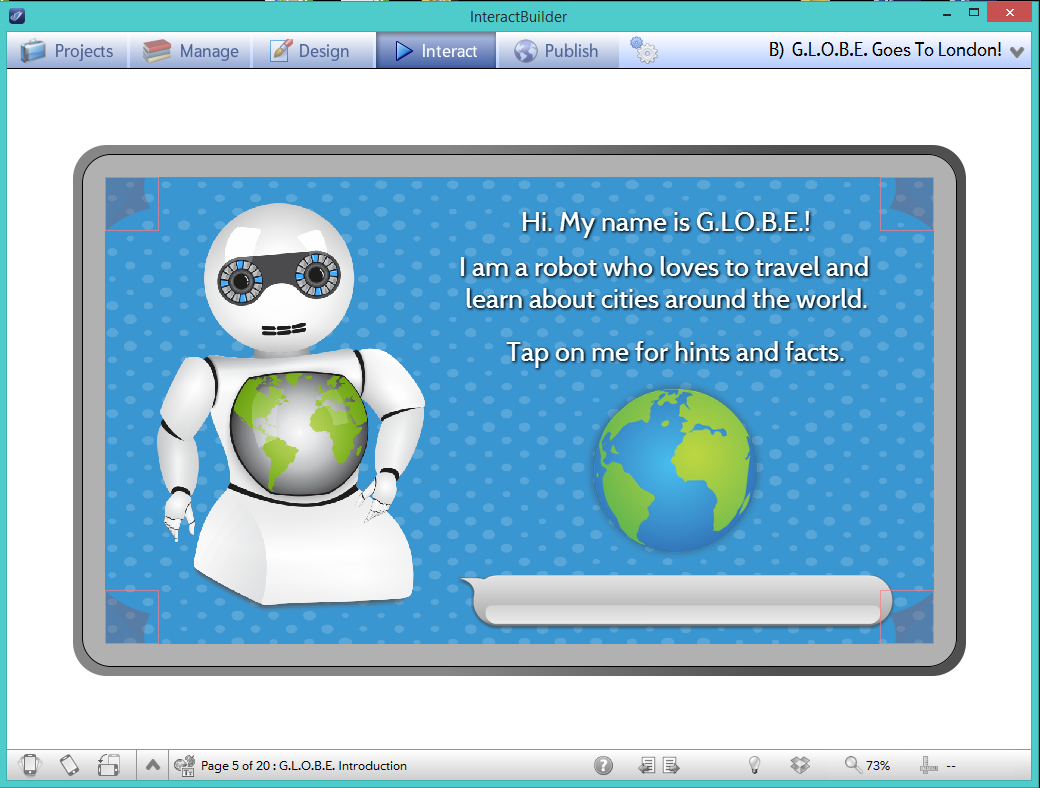
This is the preview (Took pic screenshot on iPhone of how it appears exactly) on my iPhone when I preview the app in the InteractPlayer - IOS

See where its cut off? It is now missing part of the sentence? If I have to change everything, I would have to change 12 apps. Why does this happen? I thought this was an easy app builder without having to worry about little things like this? Is it the font? What do I do to fix this throughout all of the apps instead of changing everything slide by slide for 12 different apps that are already built?
Customer support service by UserEcho