We want to hear your feedback! Submit your Questions, Ideas, Suggestions, and Problems.
Geen vergelijkbare onderwerpen gevonden.

0
Fixed
 App not Converting
InteractBuilder Version: 4.0 Build 383
Device: 700Z3A/700Z4A/700Z5A/700Z5B
Processor: 1 Processor(s) Installed.
[01]: Intel64 Family 6 Model 42 Stepping 7 GenuineIntel ~2201 Mhz
Memory: 8,106 MB
System: NT 6.2
--------------------
An error occurred while accessing the database.
An error occurred while accessing the database.
Database Error: no such table: AppProps
Query: SELECT Value FROM AppProps WHERE Property='MemberAppID'
image id 11712708 of group id 4893680 of group id 4893080 of card id 1002 of stack "C:/Program Files (x86)/InteractBuilder/Local Components/Data/InteractBuilder.livecode",mouseUp,62,button id 1020 of stack "Behaviors" of stack "C:/Program Files (x86)/InteractBuilder/Local Components/Data/InteractBuilder.livecode"
card id 1002 of stack "C:/Program Files (x86)/InteractBuilder/Local Components/Data/InteractBuilder.livecode",LoadApp,1267,button id 1007 of group id 1010 of card id 1002 of stack "Behaviors" of stack "C:/Program Files (x86)/InteractBuilder/Local Components/Data/InteractBuilder.livecode"
stack "libApp" of stack "C:/Program Files (x86)/InteractBuilder/Local Components/Data/InteractBuilder.livecode",ibTransDB,10070
stack "libApp" of stack "C:/Program Files (x86)/InteractBuilder/Local Components/Data/InteractBuilder.livecode",CheckDBErr,10012
stack "C:/Program Files (x86)/InteractBuilder/Local Components/Data/InteractBuilder.livecode",DoError,16132,button id 1004 of card id 1002 of stack "Behaviors" of stack "C:/Program Files (x86)/InteractBuilder/Local Components/Data/InteractBuilder.livecode"
Device: 700Z3A/700Z4A/700Z5A/700Z5B
Processor: 1 Processor(s) Installed.
[01]: Intel64 Family 6 Model 42 Stepping 7 GenuineIntel ~2201 Mhz
Memory: 8,106 MB
System: NT 6.2
--------------------
An error occurred while accessing the database.
An error occurred while accessing the database.
Database Error: no such table: AppProps
Query: SELECT Value FROM AppProps WHERE Property='MemberAppID'
image id 11712708 of group id 4893680 of group id 4893080 of card id 1002 of stack "C:/Program Files (x86)/InteractBuilder/Local Components/Data/InteractBuilder.livecode",mouseUp,62,button id 1020 of stack "Behaviors" of stack "C:/Program Files (x86)/InteractBuilder/Local Components/Data/InteractBuilder.livecode"
card id 1002 of stack "C:/Program Files (x86)/InteractBuilder/Local Components/Data/InteractBuilder.livecode",LoadApp,1267,button id 1007 of group id 1010 of card id 1002 of stack "Behaviors" of stack "C:/Program Files (x86)/InteractBuilder/Local Components/Data/InteractBuilder.livecode"
stack "libApp" of stack "C:/Program Files (x86)/InteractBuilder/Local Components/Data/InteractBuilder.livecode",ibTransDB,10070
stack "libApp" of stack "C:/Program Files (x86)/InteractBuilder/Local Components/Data/InteractBuilder.livecode",CheckDBErr,10012
stack "C:/Program Files (x86)/InteractBuilder/Local Components/Data/InteractBuilder.livecode",DoError,16132,button id 1004 of card id 1002 of stack "Behaviors" of stack "C:/Program Files (x86)/InteractBuilder/Local Components/Data/InteractBuilder.livecode"

Antwoord
Ezra Weinstein (Administrator)
12 jaar geleden
Please download the latest update 4.0.5 which was just released. This should resolve your issue. Let us know if you still have a problem.

0
Beantwoord
 Prompt from Empty text field not working
I am using a text field with no text in it. I am trying to create an input box where users can enter data. So I don't want any text in it to begin with. This used to work in the last version.
In the example supplied earlier, there is text in the text field. This works. But if there it no text, it does not work anymore.
In the example supplied earlier, there is text in the text field. This works. But if there it no text, it does not work anymore.
Antwoord
Ezra Weinstein (Administrator)
12 jaar geleden
The new engine renders a text element based on the length of the text itself. If you have no text in your text box then there is no area for the user to really tap, so it's best you add a transparent element on top of the text box and add the action set to the transparent element.
This is not a bug.
This is not a bug.

Antwoord
Alin Alexandru Matei
13 jaar geleden
You can disable the global elements in the Page Properties.Here it is a link to show you were to find the global elements in the Page Properties:
http://www.interactbuilder.com/userguide/lessons/Page_Features.html

0
Beantwoord
replay count error
I have an audio noise that I want to replay 4 times. It works in builder, but not in player.
Antwoord
Alin Alexandru Matei
13 jaar geleden
We were able to recreate this bug and we are working to fix it. Thank you for the feedback.

0
Voltooid
 Once again having trouble syncing with the server
Will not sync with the server getting error message 451 attaching a copy of error message. 
Same message when you click try again
Same message when you click try again
Antwoord
Ezra Weinstein (Administrator)
12 jaar geleden
We had some issues on the server tonight that caused this error, they should be cleared up now. Please try again.


Antwoord
Inna Komarovsky
12 jaar geleden
Are you trying to log into the InteractBuilder software or to the InteractBuilder web site? (I know it's confusing).

0
Not a bug
clicking Y position opens popup with X value highlighted
- When looking at element's info > position X, & Y values
- click Y value because you want to change the Y position
Actual: the popup appears with X value selected for edting. If you don't catch this you change the wrong axis and mis-position your element.
Antwoord
Alin Alexandru Matei
13 jaar geleden
When you click the Location (X,Y) to click the whole tap, you can't click only on X or only on Y.

0
Under review
Page turn default behaviour not working
Hi
I am testing my apps on the interact mode online; but when I tap on the right / left corners to go to the next / previous page, it doesn’t work! I know page turn effects (e.g Page curl) doesn’t work currently; and therefore I disabled them on my App settings, but now, the page turn default behaviour when tapping on corners doesn’t work.
I wonder if it is because I have an object in such places (an image with a circle marking where the user has to tap), but on version 3.3 this wasn’t an issue. Should I place global - invisible elements on top of the corners with the “go to next / previous page” behaviour on them? or am I missing something?
I ask you about the global element because I read that these are having some issues also; so I wonder if these is the best workaround..
thanks,
Pablo
I am testing my apps on the interact mode online; but when I tap on the right / left corners to go to the next / previous page, it doesn’t work! I know page turn effects (e.g Page curl) doesn’t work currently; and therefore I disabled them on my App settings, but now, the page turn default behaviour when tapping on corners doesn’t work.
I wonder if it is because I have an object in such places (an image with a circle marking where the user has to tap), but on version 3.3 this wasn’t an issue. Should I place global - invisible elements on top of the corners with the “go to next / previous page” behaviour on them? or am I missing something?
I ask you about the global element because I read that these are having some issues also; so I wonder if these is the best workaround..
thanks,
Pablo
Antwoord
Inna Komarovsky
12 jaar geleden
Hi Pablo,
The default page corners should still be working. And objects in the corners actually shouldn't affect them, because the page turn area is in front of all other elements. When you preview the app, are you selecting multiple pages to preview, not only the current page? In each page's "Features" tab, do you have "disable page flip backwards" and "disable page flip forwards" set to "no?"
The default page corners should still be working. And objects in the corners actually shouldn't affect them, because the page turn area is in front of all other elements. When you preview the app, are you selecting multiple pages to preview, not only the current page? In each page's "Features" tab, do you have "disable page flip backwards" and "disable page flip forwards" set to "no?"

0
Not a bug
Problem with Scrollable Background
I'm having problems with the scrollable background, and I don't understand what I'm doing wrong, as I've followed the instructions in the other feedback topics.
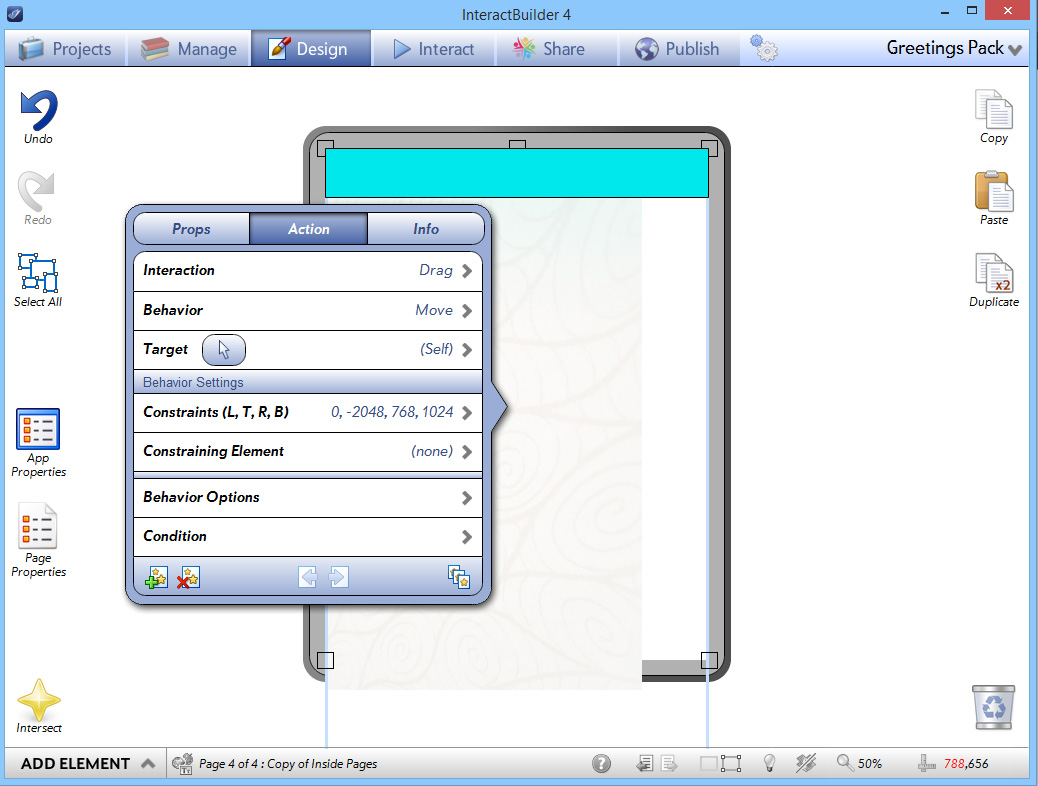
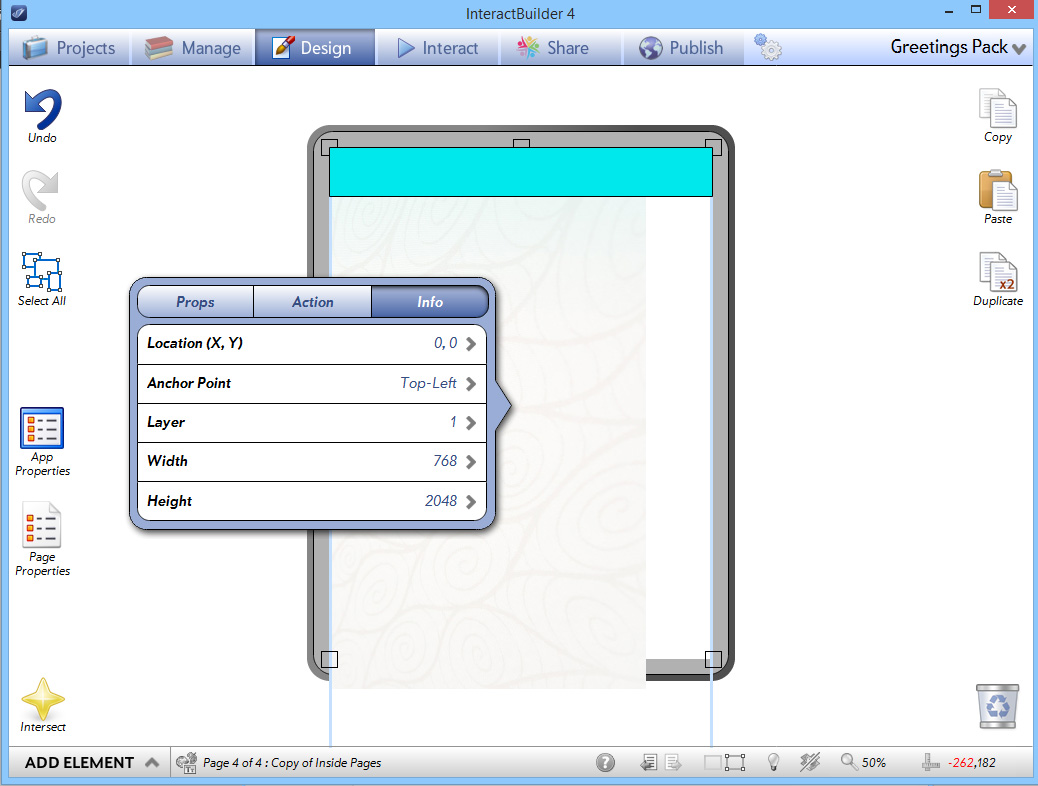
The drag-move function works up and down, which is what I want, however when I initially click to drag the image, it jumps halfway across the page, and I can't drag it back (presumably because I did the constraints properly, but I don't know where the image jumping is coming from).
Here is just a test page I made. Here are the screenshots showing the image and action settings: The image is 768 wide and 2048 tall.
Here is a screenshot showing when the page loads:

And this is what happens immediately when I click to drag. As I said it still drags up and down properly within the constraints.

Is this another glitch or did I do something to cause the image to jump when pressed?
(As it is a test page I didn't bother putting the header on the top layer, but have tried and it made no difference).
Thanks x
The drag-move function works up and down, which is what I want, however when I initially click to drag the image, it jumps halfway across the page, and I can't drag it back (presumably because I did the constraints properly, but I don't know where the image jumping is coming from).
Here is just a test page I made. Here are the screenshots showing the image and action settings: The image is 768 wide and 2048 tall.
Here is a screenshot showing when the page loads:
And this is what happens immediately when I click to drag. As I said it still drags up and down properly within the constraints.
Is this another glitch or did I do something to cause the image to jump when pressed?
(As it is a test page I didn't bother putting the header on the top layer, but have tried and it made no difference).
Thanks x
Antwoord
Inna Komarovsky
12 jaar geleden
Hi there,
This might be because we've updated the way the coordinates are set up. We used to have the bottom left corner of the screen set to (0,0), but we have since changed it to the top left corner, to match the standard that image editing programs use. Here's what you can do to get your scrollable background working:
1. First, for this situation, it's simpler if you set the graphic element to not be a scrollable element. You can change this in the element's properties. Set the Scrollable Background field to No.
2. In the element's Properties, make sure the size of the element matches the size of the original image (in this case, 768 x 2048), and set the element's Anchor Point to Middle-Center.
3. If, like in the screenshots you attached, you have the element starting with its top edge at the top of the screen, then the constraints for the Drag-Move (Self) action set should be the following:
Left: 0
Top: -1024
Right: 768
Bottom: 2048
This might be because we've updated the way the coordinates are set up. We used to have the bottom left corner of the screen set to (0,0), but we have since changed it to the top left corner, to match the standard that image editing programs use. Here's what you can do to get your scrollable background working:
1. First, for this situation, it's simpler if you set the graphic element to not be a scrollable element. You can change this in the element's properties. Set the Scrollable Background field to No.
2. In the element's Properties, make sure the size of the element matches the size of the original image (in this case, 768 x 2048), and set the element's Anchor Point to Middle-Center.
3. If, like in the screenshots you attached, you have the element starting with its top edge at the top of the screen, then the constraints for the Drag-Move (Self) action set should be the following:
Left: 0
Top: -1024
Right: 768
Bottom: 2048

0
Beantwoord
Moving an element back to it's place
How do I instantly bring an element back to it's original place (after animation)?
0ms doesn't work anymore (used to in IB3) and now 1ms movement is visible (I can see it moving horizontally and then vertically back to place). In IB3, when 0ms stopped working I used 1ms, now I can't use either one. Please advise
0ms doesn't work anymore (used to in IB3) and now 1ms movement is visible (I can see it moving horizontally and then vertically back to place). In IB3, when 0ms stopped working I used 1ms, now I can't use either one. Please advise
Customer support service by UserEcho