Frame animations when backing a page, their time. Page menu jumping around.
1. When jumping back to a page where language is to be selected, the frame animation does not appear and the menu shows the second language, instead of the first selected.
2. Frame animations have improved importantly, some delay remains. Any suggestions to solve this?
3. Page menu/scroll: the thumbnails as well as the stripe behind them no to stick to the constraints and jump around the page. What to do?
Thanks again!
C


Does anyone know of a download manager for mac, that I may use as a trial, to download the two tutorials from Amine Studios. I didn't realize that they were 2 gb, while the software for the program is only 200 mb. I do not have high speed internet serivce

Leech is supposed to be a very simple but good download manager for the Mac:

 HELP!! MY PROJECT FOLDER HAS SUDDENLY APPEARED EMPTY!
I have a really BIG problem:
I am in my last week to finish the project I was making (55 pages)… I was refining the last details… I had all wip versions in a dedicate folder (in the menu screen) within the Interact Builder. Then, I created a new project folder by mistake, which I rapidly deleted… but then, when I entered again my project folder, it was empty!! I have checked my local InteractBuilder folder on my Mac > Documents ; and I have still the associated folders with the material there; but I don't now how to recover the projects! I don't understand why they have disappeared, since it was the other (empty) folder I had just created which I deleted…
please, any of you have an idea of what has happened and how to restore the project folder??
Thanks a lot

Unable to view converted IB4 app on interact player.com
Oops! You already have 3 devices registered to share apps
Please contact support@interactstudios.com.
So how to I view my app on interactplayer,com? Do you have to reset my devices?

Bug when duplicating a Text Element
Hi again. Sorry if I only have bad news. When I duplicate a Text Element the new Text Element doesn't keep the choices I made like Font, Font size, Font colour and the rest.
Thank you for the speed you fixt the last bug.
Serge

 Webinar / Tutorial Wish List
How about creating a new Category tab on your forum for Tutorial Wish List items so folks could list topics they would like to learn how to do? Such as how to create a coloring book page (using "crayons"), Create a Maze or Create a Simple Puzzle, How to Highlight Text with Audio, etc. Or perhaps you could create some templates for folks to open in IB3 and customize with their own content to speed dev time.
Thanks!
We will be working on some of these ideas, and also adding more sample apps.

TimerPause
Layers Bug
I have a "coloring book" page with several different crayons, I want the ability to draw with each crayon without it drawing immediately until the crayon is placed where the user wants to begin their drawing on the page. (Alin provided me with the code below, however this only works with ONE crayon, when I duplicate the code on the other crayons on the page, it doesn't work on the other crayons. I have determined this is a layers issue and the code provided will only work on the crayon that is on the top layer. I think if you were able to enable multiple elements residing on the same layer, this code would work on all the crayons, not just the top level crayon. (See page 46 of the sample app I had shared with Alin awhile back). Here is the code he provided:
Crayon (On layer above Crayon_COPY), Visible Yes)
1. Drag > Move > Self > On Load >NO
2. Drag End > Hide Self
3. Drag Move >Crayon_COPY > On Load > NO
Crayon_COPY (on layer beneath Crayon) , Visible Yes)
1. Drag > Draw > set width, constraints, etc. On Page Load > Yes
2 DragEnd > Show Crayon> On Page Load > NO
3. Drag > Move Crayon
If there is another way to accomplish this, please advise.
Thanks so much for looking into this issue.
Charmaine


narration 3.0
Could you please post a video on creating a "read aloud" highlighted text sentence?
Thank you for software - it is excellent! Really looking forward to learning more
Unfortunately we have not enabled the text highlighting feature yet. You could still create your own highlighting by creating a frame animation. I will ask someone to post the technique up as a video.
Text highlighting is on our short list for version 3.3. Version 3.2.1 should be coming out in the next few days which will include several bug fixes, we expect to release a version 3.2.2 in a couple of weeks with some enhancements and more bug fixes. Version 3.3 should be released in September and will include the text highlighting.

counter target not updating as expected
Steps:
- create global counter on page 1 and give it a value
- go to page 2
- add an Action > Interaction = none, Behavior = CounterDisplay
- now on Target row click the "(Self)" and select your counter from the dropdown
5. Now under Behavior Settings, Counter click "(Self)" and select your counter name.
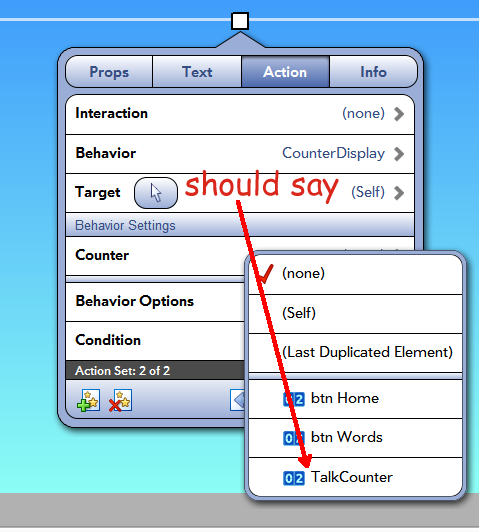
Expected: it changes to your counter name. Actual: it changes, and finally so does the "Target" "(Self)" above.
Expected: Target should change on it's own, to reflect it's selection, not depend on Counter.
Related scenario: If I skip setting Target and just set Counter, then Target won't change (until I reopen the book).
In this screenshot I've already clicked the Target "(Self)" and chosen my counter "TalkCounter", yet it didn't change. Only after I make a selection in the (duplicate data?) Counter popup will Target change.
Customer support service by UserEcho