We want to hear your feedback! Submit your Questions, Ideas, Suggestions, and Problems.
No se han encontrado topics similares.

0
Respuestas
 I want my user to upload their photo.
I really need this ebook to have the ability for the child to create their own passport.
When they tap on the stock image that is set. I want the ability to upload a photo from their camera roll. PLEASE comment and share on how this function and special feature can be achieved!
Thank you in advance!!
When they tap on the stock image that is set. I want the ability to upload a photo from their camera roll. PLEASE comment and share on how this function and special feature can be achieved!
Thank you in advance!!

Respuesta
Inna Komarovsky
hace 12 años
Hi Eleisha,
Although the feature to access the camera roll is not available, one alternative I could think of would be to let the user draw his or her portrait on the passport using the drawing behaviors. This image can be saved to the camera roll if the user wants to keep the drawing, but it cannot be displayed again on other pages of the app apart from the page on which the user drew the passport.
If you do need to display the passport at different times throughout the app, like if you want to add stamps to the passport as the user completes different parts of the app, you can link back to the same page but use conditional counter behaviors to make new elements appear on the passport. Let me know if you'd like a sample of this technique.
Thank you for your feedback!
Inna
Although the feature to access the camera roll is not available, one alternative I could think of would be to let the user draw his or her portrait on the passport using the drawing behaviors. This image can be saved to the camera roll if the user wants to keep the drawing, but it cannot be displayed again on other pages of the app apart from the page on which the user drew the passport.
If you do need to display the passport at different times throughout the app, like if you want to add stamps to the passport as the user completes different parts of the app, you can link back to the same page but use conditional counter behaviors to make new elements appear on the passport. Let me know if you'd like a sample of this technique.
Thank you for your feedback!
Inna

0
En revisión
 Publishing Statistics | Revenue/Profit Calculation Error
There is an issue with Publishing Statistics revenue and profit calculation, when apps is downloaded from a place other than US.
Unable to attach the screenshot so please take a look at the download stats for Urdu Ustad (Apple) for the month of January.
Unable to attach the screenshot so please take a look at the download stats for Urdu Ustad (Apple) for the month of January.

0
Respuestas
Global page menu graphic not showing on jump to pages
I built in a thumbnail, scrolling page menu. As I test it out in Interact mode, the graphic icon I use to access the page menu doesn't show up AFTER I tap on a thumbnail and then jump to the desired page. The page menu graphic icon is there normally on each page as long as I don't jump to the page via the thumbnails.
I do gave the page menu graphic set as global. I included all the pages in the jump to by way of the menu thumbnails. I did include the pages in the group number, otherwise the jump to behavior wouldn't be working.
So it's just that the path menu graphic is missing after I jump to a page and can't access the page menu again.
I do gave the page menu graphic set as global. I included all the pages in the jump to by way of the menu thumbnails. I did include the pages in the group number, otherwise the jump to behavior wouldn't be working.
So it's just that the path menu graphic is missing after I jump to a page and can't access the page menu again.

Respuesta
Alin Alexandru Matei
hace 13 años
Make sure that in the pages properties you have Show Global Element set to Yes, if this didn't solved this situation could you send this app to alin@interactstudios.com and we will take a look into this situation? Thank you for your feedback.
0
Respuestas
Puzzle/Match game
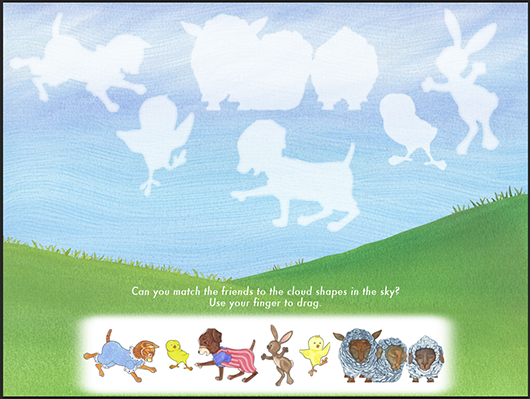
I'm creating an activity page that is both a puzzle and match game. I have the elements on the lower part of the screen and the user is going to drag them up to match and snap in place. The 3 things I want to accomplish are:
1. Snap in the correct place.
2. When the attempt to place the object where it doesn't belong, the object goes back to the beginning spot.
3. The object when it is placed correctly, becomes as large as the area it belongs in.
I've included a screen shot of the game.
Thank you!
1. Snap in the correct place.
2. When the attempt to place the object where it doesn't belong, the object goes back to the beginning spot.
3. The object when it is placed correctly, becomes as large as the area it belongs in.
I've included a screen shot of the game.
Thank you!
Respuesta
Inna Komarovsky
hace 13 años
Hi Jamie,
That looks like a great activity! Here's a technique I find helpful when creating this type of effect:
Since the image needs to be small and movable at one point and large and not movable at another point, create two separate elements for each puzzle piece.
The large pieces should be in their final places on the page (overlapping the white silhouettes), contain no action sets, and be invisible at runtime.
The small pieces should have two action sets (as well as any other effects you want to include):
- Drag-Move (Self)
- DragEnd-Move (Self) with a target location that matches the element's original coordinates.
Then for each piece you would create a set of intersections.
When the small image intersects with the correct silhouette at its center,
- Hide the small image
- Show the large image
With the intersections, you can also play sound effects or add to a counter if something should happen when all of the pieces have been placed.
That looks like a great activity! Here's a technique I find helpful when creating this type of effect:
Since the image needs to be small and movable at one point and large and not movable at another point, create two separate elements for each puzzle piece.
The large pieces should be in their final places on the page (overlapping the white silhouettes), contain no action sets, and be invisible at runtime.
The small pieces should have two action sets (as well as any other effects you want to include):
- Drag-Move (Self)
- DragEnd-Move (Self) with a target location that matches the element's original coordinates.
Then for each piece you would create a set of intersections.
When the small image intersects with the correct silhouette at its center,
- Hide the small image
- Show the large image
With the intersections, you can also play sound effects or add to a counter if something should happen when all of the pieces have been placed.

0
Respuestas
Push Notifications?
Hi guys,
I've been reading up on how to keep customers informed on app updates, etc. and was curious if InteractBuilder has push notification capability so if we launch an update or new version into the app stores, the customer will get a notice of some sort?
Thanks for your thoughts and recommendations.
I've been reading up on how to keep customers informed on app updates, etc. and was curious if InteractBuilder has push notification capability so if we launch an update or new version into the app stores, the customer will get a notice of some sort?
Thanks for your thoughts and recommendations.
Respuesta
Inna Komarovsky
hace 13 años
Hi Charmaine,
When an app has an update published, then the app marketplace notifies the user that an update is available to download, both in Apple's App Store and in Google Play. We currently don't have the option to create custom push notifications for the app.
When an app has an update published, then the app marketplace notifies the user that an update is available to download, both in Apple's App Store and in Google Play. We currently don't have the option to create custom push notifications for the app.

0
COMPLETADO
 Problem with new InteractPlayer downloaded from iTunes store
I downloaded InteractPlayer 3.4.3 Build 355 from iTunes app store yesterday and my app doesn't work properly in it. Response time when clicking on any button is slow, most buttons require multiple taps to get to work, animations are slow and out of sync with audio. I was able to revert back to InteractPlayer 3.4.2 Build 343 and things are working like they should again.
(I am using an iPad ios7)
This is the sequence I went through:
1. Went to app store and saw 3.4.3 was available.
2. Deleted my existing InteractPlayer before downloading 3.4.3
3. After downloading 3.4.3, I checked my player and it said it was version 3.4.2
4. Went back to app store. This time it said there was an update.
5. Clicked update.
6. My player now said that it was version 3.4.3
7. Downloaded my app and tested in 3.4.3 with bad results.
8. Deleted InteractPlayer from my iPad. Went back to app store and was able to download 3.4.2 again (even though it said 3.4.3 was available). This time I did not update again because I wanted to keep 3.4.2
(I am using an iPad ios7)
This is the sequence I went through:
1. Went to app store and saw 3.4.3 was available.
2. Deleted my existing InteractPlayer before downloading 3.4.3
3. After downloading 3.4.3, I checked my player and it said it was version 3.4.2
4. Went back to app store. This time it said there was an update.
5. Clicked update.
6. My player now said that it was version 3.4.3
7. Downloaded my app and tested in 3.4.3 with bad results.
8. Deleted InteractPlayer from my iPad. Went back to app store and was able to download 3.4.2 again (even though it said 3.4.3 was available). This time I did not update again because I wanted to keep 3.4.2
Respuesta
Inna Komarovsky
hace 12 años
Hi Laura, I followed your steps: I deleted my existing InteractPlayer app, I downloaded it from app store. I checked the version and it is Version 3.4.3 build 355. And it doesn't say there is an update.
Try this: delete your InteractPlayer app, turn off your iPad, turn on your iPad then go to the app store and download InteractPlayer app. Let us know if you're still having problems. Thank you for your feedback.
Try this: delete your InteractPlayer app, turn off your iPad, turn on your iPad then go to the app store and download InteractPlayer app. Let us know if you're still having problems. Thank you for your feedback.

0
Respuestas
Could you help me? I want the user to be able to erase or edit the drawing they have done in the canvas area.
I have tried to work it out- no luck. I created a canvas area and a colour select button- thanks to your great little app you sent me. I want the users to be able to erase/ edit their drawing by tapping an erase button. Thanks for your help!
Cathy Lane
Cathy Lane
Respuesta
Inna Komarovsky
hace 13 años
To allow the user to erase what they drew, you can use the SetEraseMode behavior (in the "Drawing" behaviors category). Within this behavior, you can select whether you are turning the eraser on or off. So for example the eraser button could have a Tap-SetEraseMode (on) action set, and it can switch with another button that shows that the eraser is on and will turn the eraser off when it is tapped.
Let us know if you'd like to see a sample app of this effect.
Let us know if you'd like to see a sample app of this effect.


0
Respuestas
show at tap
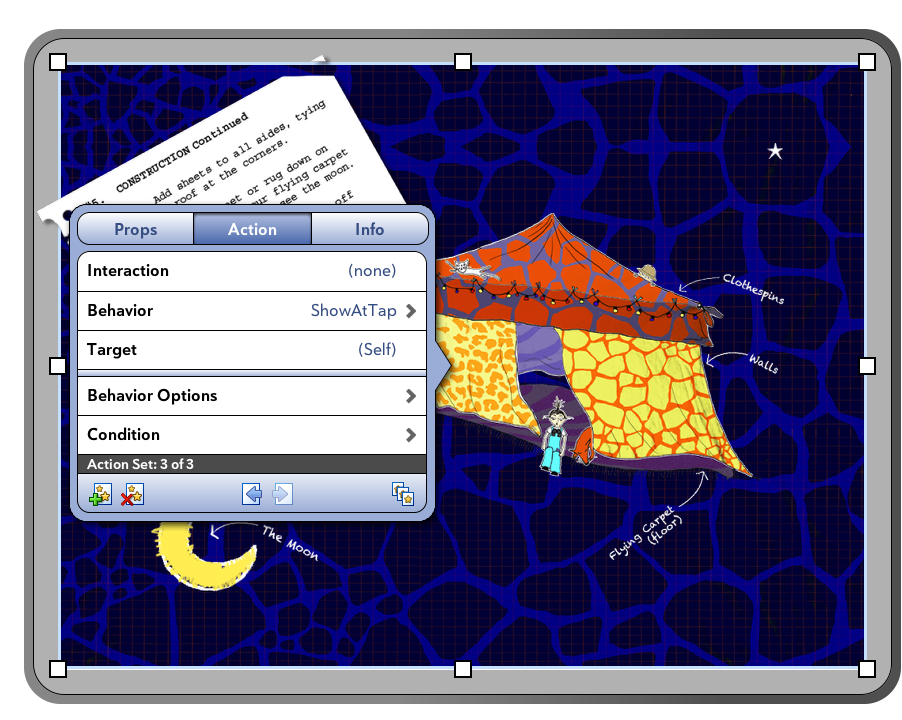
Not sure if this is possible, but I'd like to be able to tap the sky and have a star duplicate (hidden at runtime) and show at tap, so that an infinite number of stars can be duplicated (rather than having the stars as individual elements that will run out). I'm unable to select the star as the element to show at tap. I'm also unable to select tap in this instance. If I'm unable to do it this way, is there a different way?
Thanks!
Thanks!
Respuesta
Inna Komarovsky
hace 13 años
Hi! This was an interesting question, and we just found something of a workaround to create this effect where the stars appear where the user taps or clicks.
This technique uses the Pickup behavior, hides the target element and then shows it in the next location where the user taps (anywhere on the screen).
1. Place the star element outside of the screen.
2. Add the following two action sets to the sky element:
TapEnd-DuplicateElement
Target: the star element
Location: Relative, (0,0)
Number of Duplicates: 1
Execute on Page Load: Yes
TapEnd-Pickup
Target: "(Last Duplicated Element)"
Execute on Page Load: Yes
3. If there are any elements where the user might tap and you don't want the stars to appear on top of them, add the following action set in addition to any other action sets that the element has:
Tap-Hide
Target: "(Last Duplicated Element)"
Let us know if you'd like to see a sample page of this effect. Best of luck!
This technique uses the Pickup behavior, hides the target element and then shows it in the next location where the user taps (anywhere on the screen).
1. Place the star element outside of the screen.
2. Add the following two action sets to the sky element:
TapEnd-DuplicateElement
Target: the star element
Location: Relative, (0,0)
Number of Duplicates: 1
Execute on Page Load: Yes
TapEnd-Pickup
Target: "(Last Duplicated Element)"
Execute on Page Load: Yes
3. If there are any elements where the user might tap and you don't want the stars to appear on top of them, add the following action set in addition to any other action sets that the element has:
Tap-Hide
Target: "(Last Duplicated Element)"
Let us know if you'd like to see a sample page of this effect. Best of luck!
0
Respuestas
Word Highlighting NOT activated after signup as Paid Publisher...
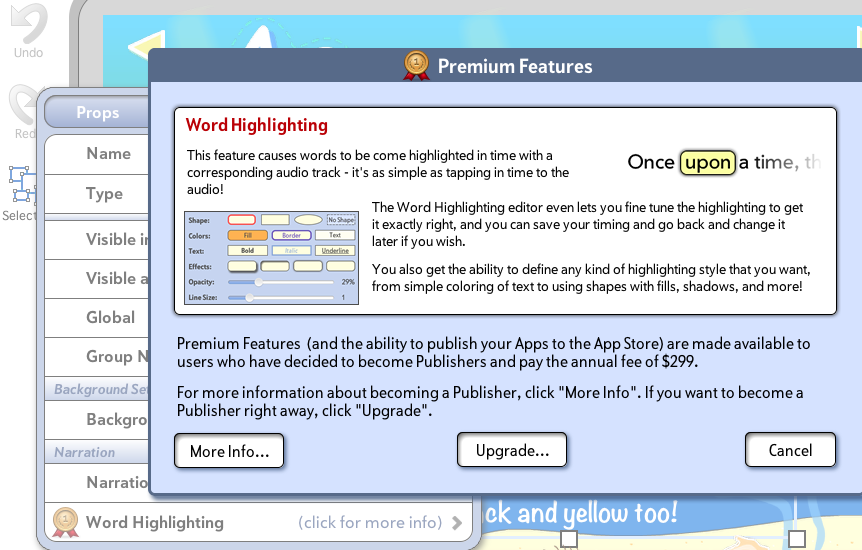
I just signed up as a Paid Publisher, hoping to be able to use the Word Highlighting feature, but it is not activated, it still shows the Premium > Click for More Info option in the Properties panel when I select my text element. I do not have the option to set word highlighting to Yes. I would expect to see the Timing interface option accessible here now that I'm a Paid Publisher. I did receive a confirmation from Paypal saying my transaction was successful and submitted to your company. Is there a waiting period before premium features are activated after signing up as a PAID Publisher? I tried rebooting and I still see the screen below. I assume I should see something different than what I am seeing below enabling me to set the word highlighting timing… Or is there somewhere else I am supposed to find the word highlighting timing option? Please advise asap as I want to wrap up my app. Thanks!

Respuesta
Ezra Weinstein (Administrator)
hace 13 años
Hi Charmaine,
Go to the Manage Screen and select "Login As Someone Else" from the Top Right menu (the icon of the person). Log in again as your registered user, this should refresh your membership level and you should be all set from there.
Ezra
Go to the Manage Screen and select "Login As Someone Else" from the Top Right menu (the icon of the person). Log in again as your registered user, this should refresh your membership level and you should be all set from there.
Ezra
Servicio de atención al cliente por UserEcho