We want to hear your feedback! Submit your Questions, Ideas, Suggestions, and Problems.
Keine ähnlichen Beiträge gefunden.

0
Fixed
 Selecting an Audio file bug
When selecting an audio file from a folder, the Target remains "None". You have to reopen the Target dialog and select it again from the list of available mp3 files (the one you have just selected is at the bottom)

0
Fixed
InteractPlayer | Animation Error
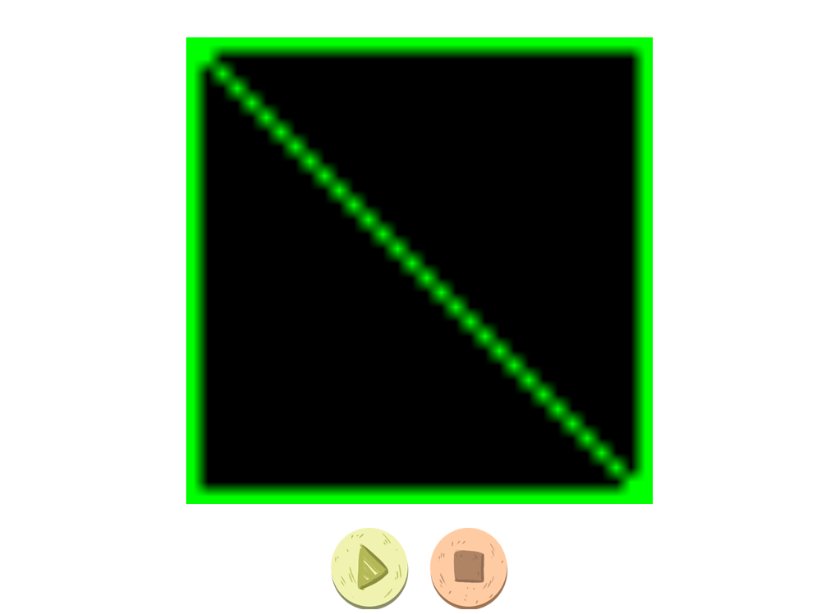
I am working on a very simple page, with an animation that is triggered by a Play button. When I run it on InteractPlayer.com, I see the attached screen "No image found error".
--
Adeel
--
Adeel

Antwort
Ezra Weinstein (Administrator)
vor 12 Jahren
Adeel, we just released build 4.0.6. With this build you can rebuild and resync your app which will fix the animation issue you are having.
To rebuild and resync your app follow these steps:
1. Go to the manage screen (the bookcase)
2. Simultaneously right click and hold your ALT key (or Option key if using a Mac). You will see a menu come up and the last option is: "Rebuild and Resync". Click this option.
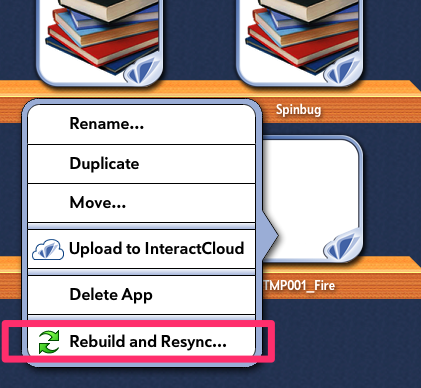
To rebuild and resync your app follow these steps:
1. Go to the manage screen (the bookcase)
2. Simultaneously right click and hold your ALT key (or Option key if using a Mac). You will see a menu come up and the last option is: "Rebuild and Resync". Click this option.

0
Abgelehnt
 Flash Elements?
Are there any plans to enable a flash animation to be imported onto the canvas as an element?

0
Beantwortet
 What version of IB should we be on now? 4.0.1 build 380?
Ann K AlteredEssence vor 12 Jahren
•
aktualisiert von Ezra Weinstein (Administrator) vor 12 Jahren •
1
I currently have 4.0.1, build 380 as of 9/5/14. I thought there was going to be a rebuild sent out to fix not being able to open previously built apps

0
Beantwortet
Match activity using the new engine
Hello,
In a previous post about 4-6 months ago you mentioned that you were working on a small document/tutorial that will describe how to setup a Match activity using the new engine. Is this document/tutorial ready yet?
In a previous post about 4-6 months ago you mentioned that you were working on a small document/tutorial that will describe how to setup a Match activity using the new engine. Is this document/tutorial ready yet?

Antwort
Inna Komarovsky
vor 12 Jahren
Hi there,
The matching effects are not yet completely fixed, so we will put together the tutorial when that is working smoothly. I apologize for the delay. We've had to focus on other bug fixes and improvements at this time.
The matching effects are not yet completely fixed, so we will put together the tutorial when that is working smoothly. I apologize for the delay. We've had to focus on other bug fixes and improvements at this time.

0
Fertiggestellt
devices registered
сообщение при подключении -
Ой!
Пожалуйста, свяжитесь с support@interactstudios.com.
Пожалуйста, свяжитесь с support@interactstudios.com.
Что я должен делать?
sehovcovs Александр
alexanim@gmail.com
Помоги мне, пожалуйста

0
Wird überprüft
Adding to homescreen for iPad won't save to cache.
I have noticed a problem with the "add to home screen" selection when I want to save the app to my iPad as a standalone app/link. It will not work offline, and when I go online, it re-downloads the app all over again. I looked on the net for this problem with Html5 and it does not appear to be a problem with my iPad settings, but a problem within the apps code. The app needs to have the cache information changed to "cache.manifest". Can this be setup in the builder? How will this be implemented for each app I want to test?
Antwort
Ezra Weinstein (Administrator)
vor 12 Jahren
This should not be happening, your app should work offline. We will double check this issue and get back to you.

0
Fixed
animation won't play on second tap
Animated graphic elements (.png sequences) set NOT to loop won't play in Interact mode on second tap. I tried changing the replay from 0, to 1, to 100 and it still won't play again on second tap. Kids will want to keep tapping things to make them happen again so it would be nice if we could resolve this.Thanks for looking into this or advising what I might be doing wrong.
Antwort
Inna Komarovsky
vor 12 Jahren
Could you make a sample app with the animations of those graphic elements? Thank you.

0
Fixed
Windows version of ITB3
William Mark Povey vor 13 Jahren
•
aktualisiert von Ezra Weinstein (Administrator) vor 13 Jahren •
0
The windows version of ITB3 sharing does not work,its just hangs then an error message pops up, but you cannot select it as the program then become unresponsive. I have been able to share an app on the Mac version with no problems.
Antwort
Ezra Weinstein (Administrator)
vor 13 Jahren
An update is imminent (we are hoping by Thursday or Friday).

0
Not a bug
global counters not working
You may already be tracking and fixing this, but just in case.
Expected: increment counter on page 2 to X, navigate to other pages and back and continue to see X on all pages that execute counterDisplay
Actual: global counter behaves as a page counter - not available to other pages, value is discarded after leaving page 2.
This is urgent for me as I want to use it to allow user to toggle off app-wide audio. See http://feedback.interactbuilder.com/topic/531056-how-can-you-play-page-and-narration-audio-together/?user_satisfaction=1#satisfaction_rating_edit
- Create a global counter on page 2
- add a button tap > counter add 1 to it, then counter display
- on other pages add this action to any element:
- behavior counter display, target our counter, execute on page load "yes"
Expected: increment counter on page 2 to X, navigate to other pages and back and continue to see X on all pages that execute counterDisplay
Actual: global counter behaves as a page counter - not available to other pages, value is discarded after leaving page 2.
This is urgent for me as I want to use it to allow user to toggle off app-wide audio. See http://feedback.interactbuilder.com/topic/531056-how-can-you-play-page-and-narration-audio-together/?user_satisfaction=1#satisfaction_rating_edit
Antwort
Inna Komarovsky
vor 12 Jahren
Hi Sean,
Here's a way to get around this problem:
1. On the pages that have CounterDisplay on page load, add a text element, and use that as the target of the CounterDisplay behavior. The CounterDisplay behavior has a separate field for Target and Counter, and the Counter field is where you can select the global counter that will display in the Target text element. So the global counter keeps track of the value, but the text elements on each page act as a container for displaying the value.
2. On the pages that use CounterDisplay on page load, go to the page properties, and set the Save Page State field to No. This makes sure that the "on page load" behaviors happen each time the page opens.
Here's a way to get around this problem:
1. On the pages that have CounterDisplay on page load, add a text element, and use that as the target of the CounterDisplay behavior. The CounterDisplay behavior has a separate field for Target and Counter, and the Counter field is where you can select the global counter that will display in the Target text element. So the global counter keeps track of the value, but the text elements on each page act as a container for displaying the value.
2. On the pages that use CounterDisplay on page load, go to the page properties, and set the Save Page State field to No. This makes sure that the "on page load" behaviors happen each time the page opens.
Customer support service by UserEcho